

Lateral movement is one of the most basic strategies attackers use to get into your networks. If you’re not careful, they can hijack user accounts and cloak their presence before you can notice or detect them. Most companies have no idea how good their cyber security posture is. They aren’t aware that they are prone to lateral movement attacks or have vulnerabilities lurking within systems which attackers can exploit to gain access and infiltrate.
In this guide, we will cover everything you need to know about detecting lateral movement. You’ll learn about lateral movement in cybersecurity, types of lateral movement attacks and processes, and so much more. Let’s start.
What Is Lateral Movement in Cybersecurity?
Lateral movement is a bunch of techniques used by adversaries to gain a stronger foothold within your network or environment once they've got initial access via an endpoint. When they get inside, they start moving across interconnected systems.
Lateral movement matters because:
- Attackers will find, access, and compromise high-value assets
- They can move to hijack sensitive data and evade defenses in real-time
- They are a key component of modern threat campaigns like APTs and ransomware
How Does Lateral Movement Work? Stages of the Attack
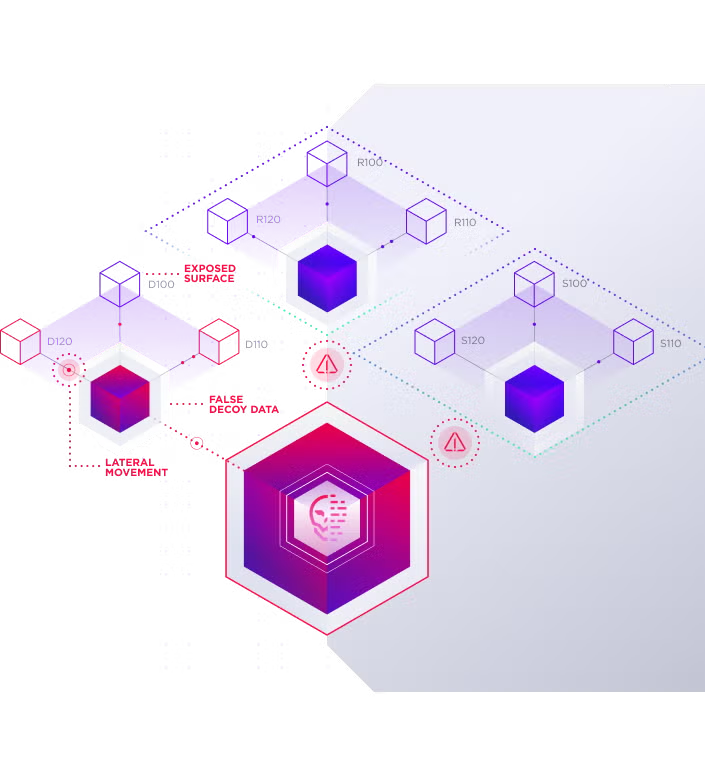
Here are the different stages of lateral movement attacks. These explain how they work:
Reconnaissance
Detecting lateral movement in cyber security starts with understanding how reconnaissance works. Recon is where your attacker will try to understand your environment. They'll take a deep look at your infrastructure, scrutinize it, and find potential targets. They'll also evaluate your network's vulnerabilities.
They study you, research, and it's an important time for them to plan their next course of action. They can use different techniques like network scanning to gather intel about your networks and systems. This information will help them mask their presence and minimize their risk of being detected by you when they carry out their subsequent actions later.
Stealing of Credentials
Attackers can do credential dumping where they get your user login or admin credentials from compromised systems. They can use tools like Mimikatz to extract plaintext passwords, PIN codes, hashes, and Kerberos tickets from memory. Once they have these credentials, they can use them to elevate privileges. This will let them move across the network and carry out higher actions completely unrestricted. They can modify your system configurations and access sensitive data easily at that point.
Lateral Movement Access
Your threats can move from one host to the next. They can collect and harvest credentials, do recon, and hop between machines fast to avoid being detected. Their goal is to reach valuable assets or systems that weren’t accessible via your initial entry points.
They can use remote desktop protocols, scheduled tasks, or execute other services remotely to connect to servers and workstations. They may implant backdoors or adjust firewall rules to maintain access. They could also map additional resources and set up footholds that let them quietly extend their reach.
Detection & Interception
Attackers will hide their tracks to slip past monitoring systems. They rely on built-in tools like WMI or PowerShell rather than unfamiliar executables, and they often move laterally through existing remote services to blend in with routine traffic. By sticking to legit credentials and scheduled tasks, they avoid triggering unusual alerts.
They also scrub event logs and limit the rate of their actions to stay under threshold-based alarms. You will see few spikes in authentication failures or process launches, since the intruder spaces out connections and tunnels data over encrypted channels. That makes spotting their presence much harder once they’re inside.
 Enhance Your Threat Intelligence
See how the SentinelOne threat-hunting service WatchTower can surface greater insights and help you outpace attacks.
Learn MoreWhat Are the Most Common Lateral Movement Techniques?
Here are the most common lateral movement techniques in 2025:
Keylogging
Keyloggers are a type of malware that will record keystrokes on your computer. Attackers can use keyloggers to steal usernames, passwords, and credit card numbers. Once they install a keylogger, they can collect your login credentials when you are busy doing your day-to-day job. It runs in the background and reports to them by saving your input info. If you want to know how to detect lateral movement, watch out for keylogging as your first step.
Pass-the-Hash
The attacker will steal a hashed version of your user's password. This can be used to authenticate them as that user. A hashed password lets them also bypass traditional password-based authentication mechanisms. Pass-the-hash (PtH) attacks only work on outdated and unnecessary user accounts.
Remote Services misuse (RDP, SMB, SSH)
Remote Desktop Protocol (RDP) will let the attacker remotely control another PC. They can move laterally because they gain legit access through the other device without seeming suspicious.
Server Message Block (SMB) is a network protocol that grants them access to shared files, printers, and serial ports. EternalBlue is a classic example of this. It was an exploit that was used in the global WannaCry ransomware attack.
SSH hijacking takes over SSH sessions. It executes commands remotely on target systems. It's dangerous as it can evade lateral movement detection. It can acquire the same level of access as original users on these SSH sessions.
Living-off-the-Land (PowerShell, WMI)
Living-off-the-Land (LotL) attacks use built-in system tools to evade detection and launch stealth attacks. PowerShell is used as the main tool for these and it's a flexible scripting solution native to Windows.
PowerShell can do tasks that blend in with regular admin activities. It masks malicious behaviors and can run malware code in memory without writing directly to files on disks. It can also query systems to find targets, exploit misconfigurations, and gain higher-level accesses.
Windows Management Instrumentation (WMI) is a collection of Microsoft specs that consolidate the management of apps and devices within networks. But cybercriminals have used these guidelines to manipulate and circumvent security tools. They have executed scripts remotely and evaded application allowlisting.
Kerberoasting/NTLM relay
Kerberoasting is a post-exploit technique that lets the attacker use a valid set of domain user credentials. They use these to crack service account passwords offline and extract them. The attacker can start with a standard domain user account that will request a Service Ticket (ST) for any Service Principal Name (SPN) that is registered on the Active Directory.
The Key Distribution Center (KDC) will soon respond and any authenticated user can ask for service tickets. Now this is where things go wrong. The domain controller won't check if the user is authenticated to use the service. The attacker can take the ticket offline and use tools like John the Ripper to crack password hashes.
NTLM relay attacks intercept and forward authentication attempts between clients and servers. When a user tries to authenticate, the attacker captures the NTLM hash and relays it to another service. The target server accepts the forwarded authentication, granting the attacker access without knowing the actual password.
Exploiting misconfigurations & trust relationships
Trust relationship attacks often begin with compromising a single account in a trusted domain. From there, attackers can enumerate trust relationships, identify cross-domain privileges, and move laterally between domains.
Misconfigurations in Active Directory provide numerous attack vectors. Weak Group Policy settings, improper delegation rights, and over permissioned service accounts create opportunities for privilege escalation. Attackers also target misconfigured DNS settings, certificate services, and authentication policies to cause lateral movement.
Why Do Attackers Use Lateral Movement?
Here are some reasons why attackers use lateral movement:
Easier to evade detection
One of the reasons why attackers prefer lateral movement is because it lets them blend in with normal network traffic. They become much harder to detect by using traditional security measures which don't work against them. They can also impersonate legit users and operate for extended periods of time without raising any alarms.
Opportunity for Privilege Escalation
When it comes to privilege escalation, it's a lot easier to start off with a low level of access, such as standard user accounts. Then the attacker can find and exploit new weaknesses, which can let them escalate their privileges. They can eventually work their way up to target administrator level access and get complete control over networks.
Expanding access to sensitive systems
Attackers use lateral movement because they can reach high-value assets and critical data quickly. They can uncover intellectual property, financial records, and get access to critical servers and infrastructure like domain controllers. They can get access to sensitive systems after gaining initial entry and slowly expand access over time.
Time to learn vulnerabilities
Lateral movement gives attackers enough time to learn about networks, users, and their target victims. It gives them enough time to work in the background, do some reconnaissance and see who and who they can't target. They can probe systems, find out zero-day exploits, and take their time to reverse engineer and hijack security solutions.
How to Detect Lateral Movement Early
Here’s what to look for if you want to detect lateral movement early in your organization:
Log EDR and NDR Signal Sources
For EDR logs, you want to look for unusual processes that spawn from remote connections to other machines. You also want to look out for the abuse of admin tools like Windows Management Instrumentation for non-standard endpoints. To examine NDR signals, analyze east-west traffic. Look for unusual port usage and data exfiltration attempts.
Check Identity Logs and Anomalous Login Patterns
Check your authentication logs and look for unusual login times and locations. If a user logs into your business outside of their usual workhouse, then that's a red flag. You also want to scan for service account activity and check the login behaviors for non-human service accounts. Failed login attempts are another sign something is wrong.
For identity logs, check if new, high-privileged accounts have been suddenly created on your network. If a user logs into multiple and disparate systems within short timeframes, that's identity abuse going underway. If your users also get elevated permissions or new access without going through the standard change-management process, it speaks volumes as well.
Graph Analytics and UEBA
You can use graph analytics models to identify anomalies and lateral movement behaviors. You can plot unusual pathways and model the timing and relationships associated with different accounts Across distant geographic locations, you can find indicators of misuse and credential compromises. It will also help you sort out behavioral baselining and spot deviations, like any accounts or systems coming in contact with others that they have never contacted before.
UEBA can be used to detect lateral movement as well. You can spot unusual file transfers, detect insider threats, and stitch up attack timelines. It also helps with automated risk scoring and can detect slower attacks that happen over longer periods of time.
Detection challenges & blind spots
Some detection challenges you may face are:
- When attackers use built-in system tools to hijack admin access and escalate privileges. They can use "living off the land" binaries to evade signature-based detection and mask their malicious activities.
- Your internal traffic can get encrypted by them to mask their lateral movement techniques. You can also experience poor configurations across overly sensitive security tools which may trigger high volumes of false alerts, thus creating more noise.
- Dynamic cloud environments can create new blind spots. Attackers can make and exploit gaps as your resources spin up and down. Some attackers can also behave within the permissions of compromised accounts and appear legit without making you suspect anything. You won't know when the account is compromised unless you use advanced UEBA solutions to scan them.
How to Prevent Attackers from Moving Laterally
Here is how you can prevent attackers from moving laterally:
Least Privilege, Identity Hygiene, PAM
Start by applying the principle of least privilege across all your user accounts. Give people only the access they need for their specific job roles, nothing more. You should also clean up your identity management by removing dormant accounts, auditing permissions regularly, and rotating service account passwords. PAM solutions can help you control and monitor cases of elevated access across environments to prevent them.
Zero Trust & Microsegmentation
Trust nobody and verify everyone. Work on building a zero trust network security architecture. You will need to verify every connection attempt and apply strict access controls based on identity, device health, and context.
Microsegmentation will help you make isolated zones within your network, with access controls enforced between them. Instead of having one large network where attackers can roam freely, you create multiple secure compartments. If an attacker compromises one segment, they can't automatically access others without separate authentication.
MFA & Credential Hardening
Multi-factor authentication can prevent hackers from getting any further—even if they get their hands on passwords. passwords. You want MFA to be in place across the board for any and all accounts—and especially privileged accounts, and not just for login screens.
Credential hardening involves strong, durable passwords, different passwords for every single application, and frequent password rotation. Automated password rotation means stolen credentials are only effective for so long because you'll have set limits on how long any one set of creds can be effective. If credentials are stolen, frequent rotation reduces the duration a hacker can use them.
Attack Surface Reduction
You can reduce your attack surface by disabling unnecessary services, closing unused ports and uninstalling applications you don't use. Regular patch management will close security gaps that attackers could potentially exploit to move between systems.
Read here about SentinelOne’s success in the MITRE Engenuity ATT&CK® Evaluation.
How to Respond When Lateral Movement Is Detected
Here is what to do and how to respond when lateral movement is detected:
Incident containment steps
Your top priority should always be stopping lateral movement immediately. Infected network segments can be separated from the rest of the network with one-time firewall rules or by removing compromised systems from the network. If you suspect specific user accounts are compromised, you should disable them immediately while you investigate.
Partition your network and instantly turn off traffic from one network segment to another. Also scan local systems for signs of the attack and segregate anything that looks questionable before it becomes an issue.
Forensics & evidence collection
You should also preserve evidence as the assault is recent. Capture a screenshot of impacted system's memory dumps, collect network logs that reflect lateral movement behavior, and save the timeline of activities. Don't shut down systems immediately - you could lose valuable forensic evidence that only resides in a system's memory.
Look for indicators of how the attacker moved between systems, what credentials they used, and which tools they deployed. This information helps you understand the full scope of the compromise and prevents similar attacks in the future.
Credential reset/rotation
Once you've determined you've got compromised accounts, change those credentials right away. And while you're at it, you should also renew passwords for any possible target accounts that may have been reached through compromised systems.
Service accounts and shared credentials need special attention because they're often overlooked during incident response. You can use automated credential rotation tools to speed up this process and ensure nothing gets missed.
Playbooks & incident response drills
Having pre-written playbooks speeds up your response time when lateral movement is detected. Your playbooks should include specific steps for isolating systems, collecting evidence, and coordinating with different teams.
You should also conduct regular tabletop exercises as you hone your lateral movement response. These drills help identify gaps in your procedures and train your team to react quickly under pressure. The more you practice, the faster you'll respond when a real attack happens.
What Are the Emerging Trends in Lateral Movement Attacks?
When it comes to lateral movement attacks, these are the emerging trends:
Cloud & hybrid environments
Cloud environments are creating new opportunities for lateral movement attacks. Hackers can use cross-account roles, misconfigurations, and accounts to pivot across various services—even on-prem solutions.
Hybrid environments also welcome them to an extent—it’s because they allow for greater access and therefore greater attack vectors between the cloud and on-prem infrastructure.
Identity-first attacks
Identity is the new perimeter, and this is why hackers have the upper hand. They don't even need to breach the network anymore. Phishing a password allows them to gain lateral movement in the environment using valid credentials. Unfortunately, this type of lateral movement occurs under the guise of authorized access; thus, many legacy security systems do not even detect these types of breaches.
In the last few years, there have been talks of sophisticated approaches to credential harvesting going around. Attacks are on service accounts and non-human identities. Hackers take advantage of identity federation and single sign-on capabilities to gain prolonged access after breaching just one account.
Supply chain compromise
Supply chain attacks allow intruders to enter your environment through trusted connections with third-party vendors. When compromised third-party partners or software dependencies are breached, cybercriminals use those associations to spread across the network after the fact.
These types of attacks are more malicious because they get into systems and data through trusted means, bypassing many of your enterprise security measures. By the time you detect that lateral movement is taking place, it's already happening.
AI/automation in attack evasion
Automated scripts can traverse a network faster than any human and can counter security measures in the blink of an eye.
In addition, there's increased reliance on "living off the land". This means that attackers use existing, native tools of the operating system to hide themselves in the midst of regular traffic. This form of automation means that lateral movement is faster and less detectable by basic, signature-based security solutions.
How to Measure and Reduce Your Organization’s Risk
What you measure you can control. These are the best metrics that tell you how good you are at preventing and detecting lateral movement:
Dwell Time & Mean Time to Detect/Respond
Dwell time measures the length of time that attackers remain undetected within a specific environment. The average dwell time across different organizations still remains measured in weeks or even months and consequently leaves attackers with ample time to pivot laterally and bring damage.
Mean Time to Detect (MTTD) is the time it takes threats to get discovered once they get into your network. Keep an eye on this value individually per type of attack, such as lateral movement attempts. Mean Time to Respond (MTTR) calculates the efficiency with which threats get remediated and contained once discovered.
The aim is adhering to the 1-10-60 rule: detect threats in 1 minute, analyze in 10 minutes, and contain in 60 minutes. These figures can be enhanced through the use of advanced endpoint detection, behavior analytics, and automated response.
Map Lateral Movement Paths
It's a good idea to always plot potential lateral movement paths through your network to identify the highest-risk routes that are likely to be used by attackers. Products like Microsoft Defender for Identity can uncover what accounts have the highest privilege escalation vectors.
Find out about accounts with access to other systems or those with unnecessary administrative permissions. This intel can be used to restrict permissions and break attacker vectors before they are exploited. Intrinsic path mapping also helps detect emerging risks as changes are made through your network.
KPIs & Internal Security Scorecards
Create scorecards tracking your lateral movement defenses over time. Key metrics are the percentage of systems with advanced endpoint protection, coverage of privileged accounts by MFA, and high-risk lateral movement vectors you've remediated.
Monitor operational metrics, like false positives produced by your detection mechanisms to see the effectiveness of your incident response processes. They will help you gauge where you've made progress and where you've got more work to do. Also monitor your security posture as a trend and not a point-in-time list. This helps you understand if your lateral movement defenses are improving or declining as your environment changes.
Which Tools Help Stop Lateral Movement?
These tools can help you stop lateral movement and here’s how:
EDR, XDR, NDR, SIEM & SOAR
You can combine endpoint, network and security-event data to catch suspicious behavior. EDR and XDR flag odd process launches and credential theft on devices. NDR spots unusual east–west traffic patterns. SIEM lets you centralize logs and run analytics across all signals. SOAR automates alert handling so you shut down malicious sessions fast.
Identity & Privileged Access Management
You should enforce least-privilege on all accounts and apply strong authentication. Every high-level credential must be managed through vaults that record use and block unauthorized changes. If you detect a sudden elevation or new privileged account, you will isolate it immediately.
Automation & Orchestration Platforms
Link security tools so that when one system spots a compromised host, scripts automatically isolate the machine, reset service-account credentials and rotate tokens. That way, attackers lose their foothold before they get a chance to shift sideways.
Deception & Honeypots
You can deploy honeypots or try deceptive tactics. These include fake assets like decoy servers, dummy credentials, and phantom databases. They will lure intruders off your real network. When these traps trigger, you get early warnings of lateral movement. You will be able to trace the attacker’s methods without risking your critical systems.
Real-World Examples: How Recent Breaches Used Lateral Movement
We don’t have exciting news for you but here’s what’s happening around the world. Here are some real-world examples of some recent breaches that were caused by lateral movement attacks:
- A new Active Directory lateral movement technique had bypassed traditional authentication and exfiltrated data. It targeted Microsoft Entra ID environments and the methods were recently revealed at Black Hat USA 2025. Dirk-Jan Mollema did the presentation and he revealed how attackers had manipulated Single Sign-On (SSO) configurations to forge Kerberos service tickets for all users.
- AWS default IAM roles were also found to enable lateral movement and cross-service exploits. These roles were often recommended and made during setup, granting overly broad permissions and even full S3 access. They could break isolation boundaries between services and even carry out admin actions.
- Sysmon researchers revisited lateral movement detection techniques. They identified lateral movement in MS Windows ecosystems and found many LM variants in functional configuration files. They did experiments, applied custom rules, and saw how logs were collected.
How SentinelOne Protects Against Lateral Movement
SentinelOne can protect your organization against lateral movement attacks in various ways. If you are seeking endpoint protection, then Singularity™ Endpoint has got you covered. It can protect your endpoints, identities, and address siloed surfaces. You can defend against machine-speed attacks and also protect against malware. It can detect ransomware with behavioral and static AI models that analyze anomalous behavior and identify malicious patterns in real-time without human intervention. It can protect mobile devices from zero-day malware, phishing, and man-in-the-middle (MITM) attacks.
When it comes to identity protection, you can rely on Singularity™ Identity. It will grant you real-time defenses for your entire identity infrastructure attack surface. You can defend against Active Directory and Entra ID lateral movement attacks. It can thwart attack progression, find, and misdirect covert actors. You will also gain intelligence and insights from attempted attacks to prevent repeated compromise.
It will enforce zero trust policies and alert you instantly when access management controls are violated. You will also get comprehensive security coverage for any device running any OS, including embedded systems, IoT, and OT.
When a threat is detected, SentinelOne's Storyline feature automatically traces the attack chain. It links malicious activities to their root causes and provides a visual forensic map for effective incident response. When it comes to protecting your cloud workloads, you can use Singularity™ Cloud Workload Security. It is a real-time cloud workload protection platform that can help you fight against ransomware, zero-days, and other runtime threats in real time. It can protect critical cloud workloads including VMs, containers, and CaaS with AI-powered detection and automated response. SentinelOne’s CWPP supports Kubernetes, physical servers, and serverless. It can also secure public, private, hybrid, and on-prem environments.
If you are looking for a holistic security solution that bundles the best of all security features, try SentinelOne Singularity™ Cloud Security. SentinelOne's AI-powered CNAPP gives you Deep Visibility® of your environment. It provides active defense against AI-powered attacks, capabilities to shift security further left, and next-gen investigation and response.
SentinelOne’s solutions also offer automated remediation and rollback features. They can automatically restore corrupted files and systems back to their pre-attack state. You can reverse any changes made by attackers at any point in time.
Conclusion
Now you’re aware of the different kinds of lateral movement attacks and common lateral movement techniques adversaries use to bypass defenses and get into systems and networks. You can start working on your cloud and endpoint security strategy to make sure you’re not subjected to their threats. If you need help in guarding against lateral movement processes and workflows, reach out to the SentinelOne team. We can help you secure your organization.
Lateral Movement FAQs
Lateral movement is when an attacker, after gaining initial access to a network, moves through different systems or accounts to find sensitive data or escalate privileges. The goal is to reach valuable assets or targets undetected.
Attackers will use stolen credentials, exploit trust relationships, and abuse internal tools to navigate through your network until they hit something worth stealing or damaging.
An attacker gets a user’s password from a phishing email, logs in, and then uses that access to connect to file servers or database systems. From there, they might use tools like PsExec or Windows Remote Desktop to hop between machines, searching for admin credentials or files they can encrypt, exfiltrate, or destroy.
The attacker starts by gathering credentials or tokens. Next, they scan for open shares, misconfigurations, or networked devices. Then, they attempt to access those systems using what they’ve stolen. If successful, they repeat the process, looking for higher-privilege accounts or more valuable targets, and often try to avoid detection by using legitimate admin tools.
Look for abnormal authentication attempts, new or unusual use of admin tools, and sudden access to sensitive resources. Monitor for accounts logging in from unexpected locations or at strange hours. Set up alerts for unusual SMB traffic, repeated failed logins, and access to critical systems outside of normal business operations.
Lateral movement happens when weak passwords, poor segmentation, or misconfigured permissions exist in your environment. Attackers exploit trust between systems, use unpatched vulnerabilities, or take advantage of employees reusing credentials. Lack of proper monitoring and failure to restrict user privileges give attackers more room to move around after initial compromise.
Common techniques include Pass-the-Hash, Pass-the-Ticket, abusing RDP, SMB, or WinRM, exploiting weak service accounts, and using tools like PsExec or Mimikatz. Attackers might also use malicious scripts, backdoors, or living-off-the-land binaries (LOLBins) to stay under the radar and jump between endpoints or servers.

