What is a Security Identifier (SID)?
Security Identifiers are the basis for identifying entities and controlling access in Windows. Discover how SIDs work, common challenges they have, and best practices for managing them appropriately.

Think of Security Identifiers as special passes with unique codes made for screening and tracking who has access to what. Now, imagine that your enterprise uses these special passes at all major entry points.
Here’s how it will typically work: Visitor passes will restrict guests to general areas, employee passes will allow staff to access work areas related to their job roles, and admin passes will let C-suite execs or other senior staff access more restricted high-risk areas. This is exactly how SIDs function in your IT systems, protecting critical systems, trade secrets and sensitive data from unauthorized access.
That said, let’s unpack the concept of Security Identifiers (SIDs), exploring what SIDs are, why they are important, how they work, and some best practices for solving common SID issues.
 What is a Security Identifier (SID)?
A Security Identifier (SID) is a unique, immutable value used in Windows environments such as Windows servers, OSes, and Active Directory to identify security principals, control access, and troubleshoot security incidents.
SIDs give security principals—such as computer accounts, users, processes and security groups—unique identifiers that distinguish them from all others, making access governance easier. Usually, a long string—e.g., S-1-5-21-3632462615-3141105534-30830830-1115, SIDs are never reused and remain the same regardless of whether the user identity changes.
Here’s what the long string of characters in SIDs means.
| Component | Meaning |
|---|---|
| s | Shows the string is an SID |
| 1 | Indicates the version the SID structure is, referred to as the SIDs revision level |
| 5 | Specifies the authority that issued the SID, known as the identifier authority. SID identifier authority values run from 0-5. 5 here refers to the NT Authority. |
| 21 | This value reflects the sub-authority value, which indicates the size of the domain. In this case, the SID has three sub-authorities. |
| 3632462615-3141105534-30830830 | Identifies the domain or local computer from which the SID originates. Combined with the sub-authority value, it ensures that if a John Reed has access to two domains, he would have different SIDs for each, and one would not be a valid Security Identifier for the other. |
| 1115 | Referred to as the relative identifier (RID), it pinpoints the security principal, ensuring that should there be two John Reeds within the same organization, neither can access sensitive resources meant for the other. |
What is the Purpose of Security Identifiers in Cybersecurity
The primary purpose of SIDs in cybersecurity is to provide an adequate basis for identity and access management in Windows environments. SIDs play the following critical roles.
- Object identification: SIDs associate security principals with specific IDs to make entities easy to identify and their activities around sensitive files easy to audit.
- Access control: Windows checks SIDs against access control lists (ACLs) to determine the permission levels associated with specific security principals. This ensures that users are granted no more nor less than the permissions (read, write, delete, etc.) specified in the access control lists.
- Monitoring and auditing: SIDs are used in Windows logs to track access events such as login attempts and file changes. This lets security teams keep tabs on user activity, isolate compromised accounts and troubleshoot security incidents like failed login attempts, unauthorized file deletion, etc.
- Security: As they are generated using complex hashing mechanisms and embedded in access tokens, SIDs, unlike username/password pairs, are difficult to steal, decipher, or duplicate, limiting the risk of breaches. SIDs also offer cross-domain access features that enable consistent access controls across various domains in enterprise networks.
Where are Security Identifiers Used?
Windows uses SIDs to manage file access, group permissions, and system-level functions in the following elements:
- Security descriptors: to designate an object’s ownership, e.g., the principal to whom a file belongs.
- Access control entries: to indicate trustees who are allowed or disallowed access, and the access events that are audited.
- Access tokens: to provide proof of who the user is, the group they belong to, and the type of permissions they have.
Security Identifier Lookup: How to find a Security Identifier Number
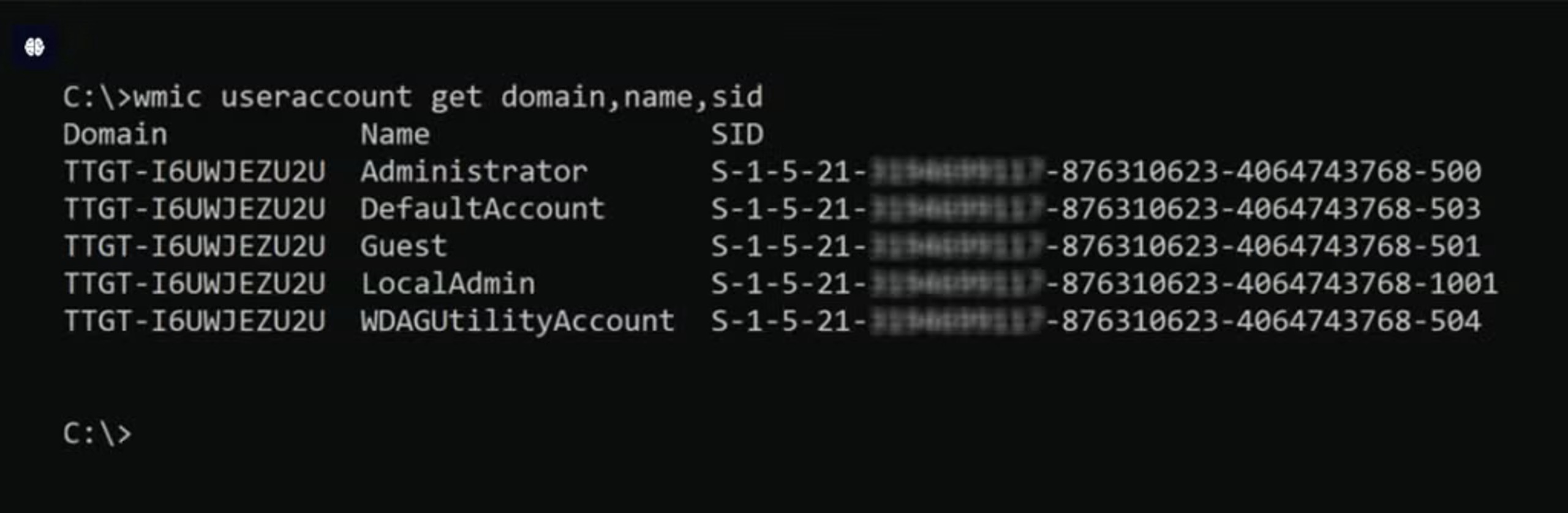
Now that we understand what Security Identifiers are and their purpose, here is how to retrieve a user’s SID:
Navigate to the Windows Registry Editor and open the Windows Management Instrumentation Command (WMIC). It’s a CLI for performing admin tasks. Once opened, run the command:
wmic useraccount get domain,name,sid
 Security identifiers vs. Usernames
Security identifiers are machine-readable character strings that control user access, while usernames are human-readable character combinations that identify users. The table below highlights the top differences.
| SIDs | Usernames |
|---|---|
| Unique and unduplicable, offering an added security layer | Often duplicated across environments, which is why stolen username/password pairs are major attack vectors in brute force attacks and other related attacks |
| Immutable—a user’s SID within a domain never changes except when their account gets deleted | Largely changeable |
| SIDs are generated via hashing, making them more difficult to tamper with. | Usernames are generated using plain text and are easier to tamper with. |
Though Security Identifiers and usernames are two different concepts, they work harmoniously to secure identities and network resources in Windows environments.
Types of Security Identifiers
Windows offers quite a range of SIDs, each one serving a different purpose from the next.
Here’s a breakdown of some key types of Security Identifiers:
- Well-known SIDs: These are generally constant identifiers that identify generic users and groups. Windows predefined these SIDs with specific meanings. For example, the SID for Everyone – S-1-1-0 includes all users, while Local Administrators – S-1-5-32-544 represents the local administrators’ group.
- Globally unique identifier (GUID) SIDs: GUIDs are Active Directory’s object identifiers. They are assigned to new objects alongside Well-known SIDs when new domains or accounts are created.
- Relative identifier (RID) SIDs: RIDs are the unique character strings at the end of SIDs. They identify specific principals within a domain or group.
- Domain-specific SIDs: These SIDs depict a Windows or Active Directory domain and the entities within the domain. These SIDs include a domain SID, followed by a unique RID for each object in the domain.
- Security Account Manager (SAM) SIDs: In Windows, SAM databases house the user and account credentials that gatekeeper access to sensitive assets. SAM SIDs are the values that identify the principals within or with access to the SAM database.
- Virtual account SIDs: These are SIDs for verifying and enforcing the permission levels granted to apps, services and processes.
How Do Security Identifiers Work?
Consider SIDs the foundation on which you build your IAM fortress in Windows. Here’s how SIDs work.
- SID assignment: When an account is created in Windows, an associated SID is instantly generated, assigned, and stored in a security database.
- SID-to-ACL correlation: Once SIDs are generated, they are linked to the permissions and privileges outlined in Access Control Lists.
- User authentication: Every time a security principal logs on, Windows first verifies that the login details are valid. If they are, it retrieves their SID from the database and places it in a token.
- SID-based access control: Windows checks the SID against the security settings—also included in the access token—to determine what files and resources the principal can access.
Setting up a Security identifier (SID)
SIDs are generally activated by default in Windows systems once entities are created. Still, some services—e.g., Kernel drivers and the System Center Operations Manager (SCOM) HealthService, which monitors the SQL server—do not automatically come with service SIDs.
To set up SIDs in such services, configure the service to be able to use a service SID. Then, create the login process that will trigger SID authentication. For example, to set up SID for the SCOM HealthService:
- Use SC.exe, a CLI in the Windows SDK, to create the SID.
- Query the SQL database-level security settings and permissions to verify that the SCOM HealthService SID has been created.
- Create a Windows login within the SQL Server using a query or the SQL Server Management Studio (SSMS).
- Assign roles and permissions to the SID the same way you’d do for entities with default SIDs.
Common Issues with Security Identifiers and How to Fix Them?
Like all mechanisms designed to enhance security, SIDs have their issues and risks. Here is a brief overview of the top issues with SIDs and how to fix them.
1. SID History Injection Exposure
SID history injection exposure is a vulnerability that allows hackers to exploit SID History by injecting SID values that enable privilege escalation or remote access to sensitive resources.
To prevent SID history injection exposure, delete orphaned accounts and use identity detection and response tools. These tools can help manage security principals and detect identity threats in real time. You can also use SIEM tools to log and audit access patterns and activities around SIDs.
2. Duplicate SIDs
SIDs get duplicated when two domain controllers responsible for issuing unique SIDs get the same relative ID pools. This allows unintended entities to access permission meant for their counterparts in the duplicate domain, posing severe risks of insider threats and lateral movement.
You can fix this by using Ntdsutil to find and reconfigure duplicate SIDs. You can also keep track of domain controllers to ensure that the same RID pool is never allocated twice.
3. Orphaned SIDs
Just like orphaned accounts often remain when users leave enterprises or change job roles, orphaned SIDs remain in ACLs when security principals are deleted or moved to a different domain. If left undiscovered for a long time, orphaned SIDs can be used to carry out advanced persistent threats (APTs).
Regularly run PowerShell scripts to identify orphaned SIDs and remove all associated permissions.
4. Unresolved SIDs
Unresolved SIDs are SIDs that do not match with friendly names in the system. This may not be an issue if it is a Capability DID—they do not resolve like other SIDs. But if the unresolved SID is not, then it may be a duplicate SID, an SID with a deleted account or an SID with a broken trust relationship.
To find and fix the root cause, enable debug logging or use Ntdsutil to fix duplicate SIDs.
Best Practices for Security Identifier Management
Proper SID management is key to securing your Windows networks. Here are some SID management tips.
- Where available, always choose system-generated over manual SIDs. Manual SIDs are prone to human error.
- Enforce the principle of least privilege (POLP) by granting users the minimum permissions required to complete their tasks effectively.
- Allow or deny role-based access to groups, not individual users. This limits the risks of orphaned SIDs, bringing permissions from previous roles when users switch jobs or job roles.
- Find and delete orphaned SIDs regularly and update the permissions associated with them to eliminate excessive or outdated permissions and minimize access sprawl.
- Treat SIDs as secrets. Do not share or store in unsecure places; there’s always an attacker hunting for the next victim.
- Use SIEM tools to log user activities, access patterns, and SID changes. This will provide monitoring data for detecting suspicious SID-related incidents before breaches occur.
- Backup ACLs, SIDs and associated permissions to enable seamless recovery when security incidents or disasters occur.
- Patch systems and software regularly; you do not want hackers exploiting vulnerabilities in your systems to manipulate SIDs and access sensitive assets.
How to Manage Security Identifiers in Windows Environments
To effectively manage SIDs in Windows, you must:
- Automate SID management tasks like backing up SIDs and ACLs, finding duplicate SIDs, and deleting orphaned SIDs.
- Properly define ACLs, including permission and associated SIDs, taking into consideration core access control concepts like POOP, RBAC and just-in-time access (JIT).
- Use centralized identity and access (IAM) management solutions, monitoring platforms, and prebuilt programs where necessary. IAM tools streamline identity governance, preventing over-permissions and other identity risks. Monitoring platforms help you detect identity threats before attackers can penetrate your systems. Built-in programs like PowerShell are useful for resolving SIDs, changing SID configurations and deleting orphaned SIDs.
- Prevent unauthorized access to SIDs and access configurations.

AI-Powered Cybersecurity
Elevate your security posture with real-time detection, machine-speed response, and total visibility of your entire digital environment.
Conclusion
Security Identifiers (SIDs) are critical to managing secure access to sensitive files, folders and assets in Windows environments. SIDs uniquely identify entities and their permissions, ensuring that logged-in users can only access resources specified in Access Control Lists (ACLs).
In addition to preventing unauthorized access, they enable domain administrators to keep track of entities interacting with mission-critical assets and prevent breaches.
However, SIDs are only effective when associated risks are addressed, SID best practices are implemented, and proper SID management and monitoring are enforced.
FAQs
An SID is a unique alphanumeric character string for identifying trustees in Windows environments.
To translate between usernames and corresponding SID values, use the Windows Local Security Authority (LSA).
To lookup an SID, run the following command on the Windows Command Prompt:
wmic useraccount get domain,name,sid
Windows uses SIDs as an effective way of distinguishing security principals. For example, in a scenario where two people in an organization bear the same name, e.g. Rob Smith, the SID becomes critical for differentiating Rob Smith 1’s permissions from Rob Smith 2’s. Windows also use SIDs to ease access control and facilitate incident troubleshooting.
Common examples of SIDs include Word SIDs—S-1-1-0, Null SIDs—S-1-0-0, and Local account SIDs—S-1-5-113.
SIDs typically come in the form of a long string of numbers preceded by a letter S. For example: S-1-5-21-3632462615-3141105534-30830830-1115.
You generally do not need to manually change your SIDs as they are auto-generated. However, if you need to, you can:
- Delete the account and re-add it to the domain, thereby triggering a new auto-generated SID.
- Use Sysprep in the Windows Command Prompt. However, this will require having admin privileges, and overly frequent use may lock out the account.
Discover More About Cybersecurity


Experience the Most Advanced Cybersecurity Platform
See how the world’s most intelligent, autonomous cybersecurity platform can protect your organization today and into the future.