

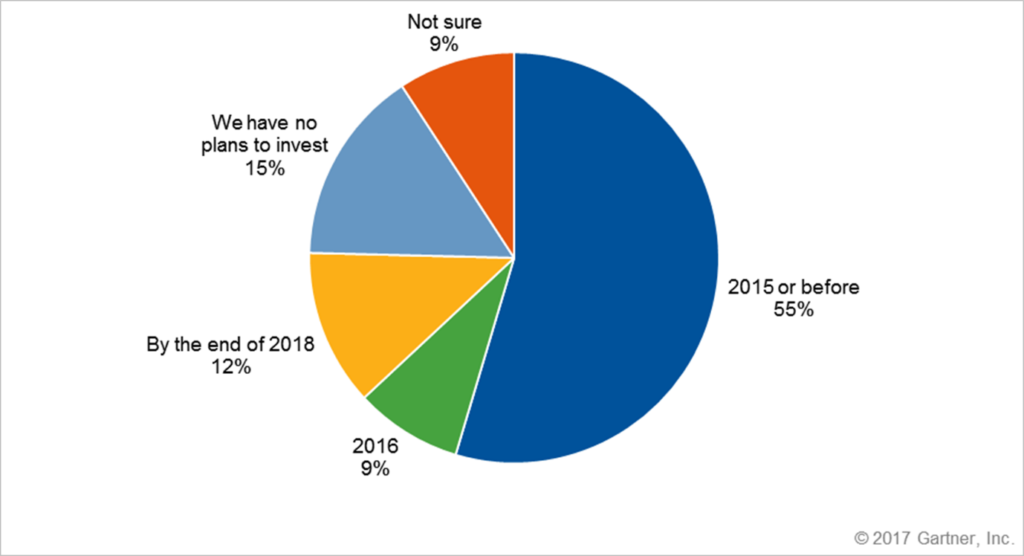
In recent years, VDI (Virtual Desktop Infrastructure) implementations have become more common than ever before. VDI hasn’t replaced the entire desktop market as some predicted, but more and more enterprises have adopted VDI environments due to a variety of operational benefits. According to Gartner, large enterprises adopting VDI at high rates, with only 15% not planning to invest in VDI technology.
VDI Usage (Worldwide, Minimum 50 IT FTE)
Several verticals stand out in regards to VDI adoption among large enterprises. The healthcare industry, due to the mobile nature of clinical duties and the dependence upon electronic medical records is one. Another example is financial services sector has a history of active usage of VDI.
Education and Public Sector are also showing high demand. Schools need to solve VDI for student labs, but the main obstacle to greater VDI adoption for education remains cost.
The Need for Securing VDI
Common risks impacting data still prevail in VDI environments: ransomware, social engineering, drive-by downloads, network sniffing, vulnerability exploits, insider threats, privileges escalation, and malware. Some would claim VDI is a more secure option, mainly because one can terminate the VDI instances once done, but the overall security state is strong as its weakest link – and VDI deployments tend to be exactly that for several reasons:
- Patching cycles require updating the golden image and are therefore not rapid.
- VDI implementations commonly try to consume as little resources as possible, so administrators try to reduce the amount of software deployed – something in the expense of protection.
- The human factor: users tend to be less aware of security implications when running on VDI because they often don’t own the system and use it for a temporal session. [why?]
VDI Approaches
In the world of virtual desktop infrastructure, there are two basic approaches: persistent and non-persistent.
Persistent VDI
Persistent VDI means a virtual session, but the users have a desktop, where they can save files, change configuration, and customize at will. In the background, each desktop runs from a separate disk image. These types of desktops allow personalization, but they require more storage and backup than non-persistent desktops, detailed below. Users that log in daily much prefer this approach, but it reduces some of the benefits of VDI, like saving storage costs, ease of patching, and visibility on assets.
Non-Persistent VDI
Many VDI advocates claim that non-persistent desktops are the way to go because they’re easier to manage than persistent VDI. With nonpersistent, a single disk image is shared among many users. As each user logs in, he or she gets a clone of the shared master desktop, and then that clone is customized on-demand with app virtualization (Microsoft App-V, VMware ThinApp, etc.) or with user environment virtualization (AppSense, RES, etc).
There are many benefits to this approach, like ensuring 100% success with a patch management program, but the lack of persistence may also affect users, as they cannot save files locally or do other things, like change the desktop background or install new applications.
Other Trends
In many cases, enterprises choose a hybrid mode: running non-persistent images but allowing dedicated storage for several applications.
Another trend that is picking up is DaaS (Desktop-as-a-Service) where the sessions live in the cloud. A third-party then hosts the virtual desktop infrastructure backend of a deployment. You can see a growing interest of giant vendors offering DaaS (Microsoft Azure, Amazon WorkSpace). Other traditional approaches of on-premise VDI include Citrix with its XenDesktop/XenApp products and VMware with its HorizonView view line of products.
Regardless of the implementation chosen, the following elements must be covered:
6 Key Factors to Consider for VDI Security
To address security, manageability, and performance needs, security software needs to meet the following benchmarks before VDI deployment:
1. Don’t Settle for Reliance on Updates
As mentioned, some VDI scenarios like “non-persistent” terminate each individual session and always start from the base image. Products that rely on updates will create an “AV storm” every time users login because they mandate an update. Products which rely on updates for security need to overcome the challenge of new sessions starting over and over again and then trying to update them. Once a session terminates, this vicious cycle repeats, consuming bandwidth, resources and impacting productivity. For these reasons, deploying security products has traditionally been quite painful in VDI environments.
2. Require Ease of Management and Avoid Duplicate Entries
Ease of management is another critical factor. In VDI environments, device naming conventions cannot be ensured or standardized. Most VDI vendors allow setting naming conventions, but names often repeat with new sessions. As such, AV products, which rely on device names to identify users and console parameters, see collisions causing both unnecessary operational strain and end-user impact. Another important criterion is automated de-commision capabilities. An AV product which manages VDI without retiring closed sessions leads to numerous “phantom devices” rendering a distorted operational view and inability to manage assets effectively at scale.
3. Base Image Scans Are Needed
The last thing desired when deploying a VDI setup is to bake malware to every instance. If you don’t ensure the golden image is flawless, you are taking a considerable risk. Products which solely rely on “seeing” the malware dropped to the disk or simply checking only on file execution are not sufficient for this attack surface, leaving your VDI environment vulnerable.
4. Require Equivalent Protection and Functionality
Some vendors offer dedicated agents for VDI albeit with limited functionality. This leaves VDI environments as an exposed attack surface. Aside from convenience for your AV vendor, there is no reason to have crippled VDI coverage. Look for vendors who do not compromise and can deliver full protection, visibility, and response capabilities. VDI endpoints should also be surfaces where SOC analysts can threat hunt, because if suspicious activity is identified, you need to get to the root of the suspicious activity to find the real infection trail.
5. Calculate the True Costs
There are two common licensing models:
- Concurrent license model (pay as you go) – You pay for the max users who run in parallel. Concurrent user licensing allows you to purchase software at a lower cost because the maximum number of concurrent users expected to use the software at any given time (those users all logged in together) is only a portion of the total system users employed at a company. For example, for 5,000 users who work in 2 shifts, only 2,500 licenses are needed.
- Per-seat license model (pay for each user) – Each seat consumes a license – based on the number of individual users who have access to the VDI infrastructure. For example, a 5,000 user license would mean that up to 5,000 individually named users can access the software.
Naturally, look for a concurrent license model as it will reduce your costs.
6. Performance Impact Matters
One advantage of VDI is a reduction in hardware and operational costs. If you end up with an AV solution that requires resource allocation as if it was a physical device, you miss a core value of using VDI. Another aspect that will influence VDI performance is the number of applications you need to install on the base image. Opt for endpoint protection solutions that are lightweight and robust so that computer power and end user experience/productivity aren’t compromised to run AV. Avoid solutions with multiple agents, as it means more resource consumption.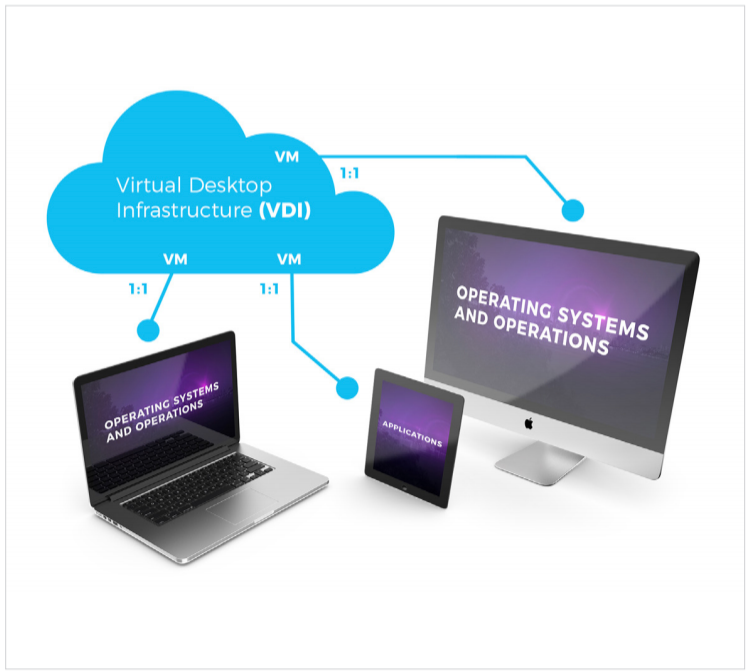
Why Choose SentinelOne
The SentinelOne autonomous agent meets and exceeds all the criteria above. It is an efficient solution to secure the growing demand for desktop virtualization, including thin clients, layered apps, and other VDI scenarios. It does not need updates and is not dependent on signatures or other legacy antivirus requirements. SentinelOne natively supports all common VDI scenarios without compromising on functionality or protection, including:
- Desktop virtualization: Host a desktop operating system in a VM on a centralized server. Examples of enterprise application virtualization software include Citrix XenDesktop, Microsoft App-V, VMware Horizon, and Systancia AppliDis.
- Terminal Services: A server-based computing and presentation virtualization component to access applications and data on a remote computer over a network. Examples include Microsoft Windows RDP and Citrix XenApp.
- Desktop-as-a-Service: Remote desktop virtualization from SaaS Cloud computing. Examples of enterprise Desktop as a Service are VMware’s Horizon DaaS, Amazon’s WorkSpaces.
[1] Gartner, Market Trends: VDI Demand Is Growing, but Not Everyone Will Be Successful, by Michael Warrilow and Nathan Hill, April 2017, https://www.gartner.com/document/code/325320
SentinelOne supports the following virtual providers:
- VMware vSphere
- VMware Workstation
- VMware Fusion
- VMware Horizon
- Citrix XenApp
- Citrix XenDesktop
- Amazon WorkSpaces
- Microsoft Hyper-V
- Oracle VirtualBox
Reduce Identity Risk Across Your Organization
Detect and respond to attacks in real-time with holistic solutions for Active Directory and Entra ID.
Get a DemoConclusion
VDI security fuses endpoint security, network segmentation, data encryption, and access controls. There are many approaches to it but the best ones are the options that work for your infrastructure. There are many benefits to VDI security but the biggest ones is how you can future-proof your organization. SentinelOne can streamline your VDI security journey and be a valuable partner in that regard. Try us out and see how we can help your organization today.
VDI Security FAQs
Virtual Desktop Infrastructure (VDI) lets you run desktop environments on remote servers instead of local machines. Users connect over a network to access a full Windows or Linux desktop from anywhere.
VDI centralizes desktop management, so security patches and configurations live on the server. You still interact with a familiar workspace, but data never leaves the data center, reducing exposure on endpoint devices.
VDI security matters because desktops run on centralized servers, making them high-value targets. If attackers breach a VDI host, they could access many user environments at once. Proper security prevents malware spread between sessions and protects corporate data from being copied to unsecured endpoints.
Strong VDI defenses also ensure compliance with data-handling policies and safeguard remote workers, keeping the entire infrastructure safe.
First, enforce multi-factor authentication for every connection to the VDI gateway. Segment networks so management interfaces aren’t exposed to users. Keep hypervisors, connection brokers, and guest images up to date with patches. Apply least-privilege user rights inside virtual desktops.
Use endpoint security agents and monitor session activity for anomalies. Back up your critical images regularly and test restoration procedures to ensure rapid recovery when needed.
A Virtual Private Network (VPN) creates an encrypted tunnel between your device and a network, extending local access but leaving data on your endpoint. VDI delivers the entire desktop from a secure server without storing data locally.
VPN protects traffic; VDI safeguards data location. With VPN, endpoints still run applications; with VDI, apps execute on the server, isolating them from potentially compromised user devices.
VDI centralizes execution and storage, so sensitive files never reside on user devices. You control snapshots and user permissions at the server level, limiting unauthorized changes. If an endpoint gets infected, the threat can be contained within that session.
You can roll back images instantly to wipe out malware. Central logging gives complete visibility into user actions, helping you detect and respond to security events quickly.
Security tools for VDI include endpoint detection and response (EDR) agents installed on virtual desktops, network segmentation firewalls, and micro-segmentation platforms. Identity and access management (IAM) solutions add secure login controls.
You’ll also need to use cloud access security brokers (CASBs) for cloud-hosted VDIs, plus intrusion detection systems (IDS). Backup and disaster recovery solutions to protect your important images. Vulnerability scanners can also help devices stay patched.
Risks include misconfigured broker servers or exposed management ports, which attackers can exploit. Stale desktop images without patches open vulnerabilities. Shared hypervisors can lead to “noisy neighbor” exploits if isolation fails. Weak authentication lets unauthorized users in. Inadequate monitoring hides lateral movement.
Finally, insufficient backup testing means you can’t recover quickly after a breach, extending downtime and potential data loss.
Start with granular access controls and enforce strong, multi-factor authentication. Segment management and user networks. Automate patching of hypervisors and desktop images. Deploy EDR and continuous monitoring inside each virtual desktop. Use encrypted storage and secure protocols for all traffic.
Regularly back up and test golden images. Train users on phishing risks and limit local USB or clipboard access to stop data leakage.

