Rhysida Ransomware: In-Depth Analysis, Detection, Mitigation
What Is Rhysida Ransomware?
The Rhysida ransomware group was first observed in May of 2023, following the emergence of their victim support chat portal hosted via TOR (.onion). The group positions themselves as a “cybersecurity team” who are doing their victims a favor by targeting their systems and highlighting the supposed potential ramifications of the involved security issues.
What Does Rhysida Ransomware Target?
Details of Rhysida’s victimology are currently unavailable. At this time, campaigns do not appear to be specific nor targeted.
How Does Rhysida Ransomware Work?
Rhysida is deployed in multiple ways. Primary methods include deployment via Cobalt Strike or a similar framework, and through phishing campaigns.
Analyzed samples of Rhysida ransomware indicate that the group is in the early stages of the development cycle. The payloads are missing many commodity features such as VSS removal that are synonymous with present-day ransomware. This said, the group threatens victims with public distribution of the exfiltrated data, bringing them in line with modern-day multi-extortion groups.
When launched, Rhysida will display a cmd.exe window as it traverses all files on all local drives. Victims are instructed to contact the attackers via their TOR-based portal, utilizing their unique identifier provided in the ransom notes. Rhysida accepts payment in BTC (Bitcoin) only and provides victims with information on the purchase and use of BTC on the victim portal. Upon providing their unique ID to the payment portal, an additional form is provided allowing victims to provide more information to the attackers for authentication and contact detail purposes.
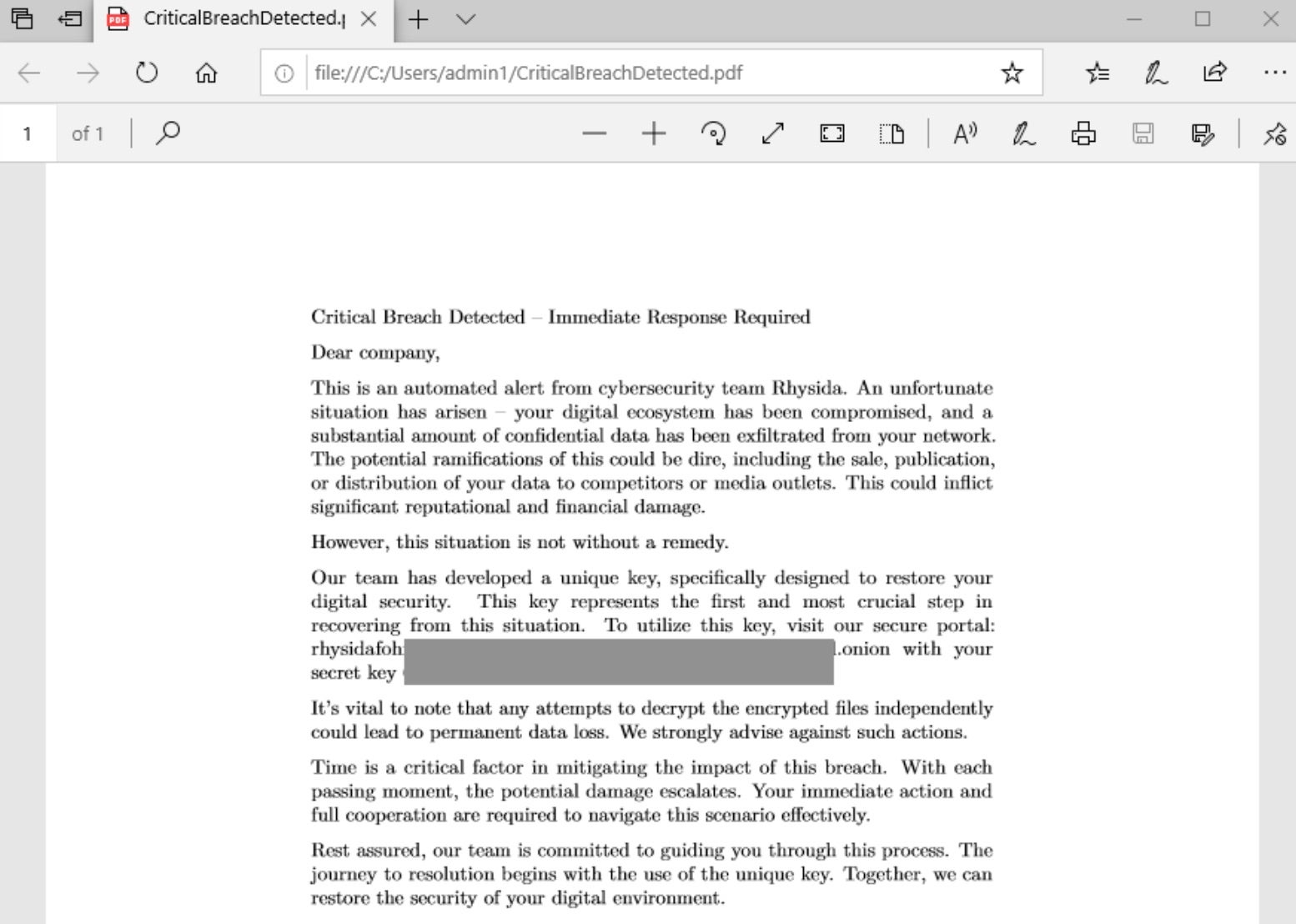
Rhysida ransom notes are written as PDF documents to affected folders on targeted drives.
Rhysida attempts to replace the desktop background via multiple commands. In currently analyzed samples, this feature is not functional and appears to fail. Executed commands include:
cmd.exe /c reg delete "HKCU\Conttol Panel\Desktop" /v WallpaperStyle /f

reg.exe delete "HKCU\Conttol Panel\Desktop" /v WallpaperStyle /f

cmd.exe /c reg add "HKCU\Software\Microsoft\Windows\CurrentVersion\Policies\ActiveDesktop" /v NoChangingWallPaper /t REG_SZ /d 1 /f

reg.exe add "HKCU\Software\Microsoft\Windows\CurrentVersion\Policies\ActiveDesktop" /v NoChangingWallPaper /t REG_SZ /d 1 /f

cmd.exe /c reg add "HKLM\Software\Microsoft\Windows\CurrentVersion\Policies\ActiveDesktop" /v NoChangingWallPaper /t REG_SZ /d 1 /f

reg.exe add "HKLM\Software\Microsoft\Windows\CurrentVersion\Policies\ActiveDesktop" /v NoChangingWallPaper /t REG_SZ /d 1 /f

cmd.exe /c reg add "HKCU\Control Panel\Desktop" /v Wallpaper /t REG_SZ /d "C:\Users\Public\bg.jpg" /f

reg.exe add "HKCU\Control Panel\Desktop" /v Wallpaper /t REG_SZ /d "C:\Users\Public\bg.jpg" /f

reg.exe add "HKLM\Software\Microsoft\Windows\CurrentVersion\Policies\System" /v Wallpaper /t REG_SZ /d "C:\Users\Public\bg.jpg" /f

cmd.exe /c reg add "HKLM\Software\Microsoft\Windows\CurrentVersion\Policies\System" /v WallpaperStyle /t REG_SZ /d 2 /f

reg.exe add "HKLM\Software\Microsoft\Windows\CurrentVersion\Policies\System" /v WallpaperStyle /t REG_SZ /d 2 /f

cmd.exe /c reg add "HKCU\Control Panel\Desktop" /v WallpaperStyle /t REG_SZ /d 2 /f

reg.exe add "HKCU\Control Panel\Desktop" /v WallpaperStyle /t REG_SZ /d 2 /f

cmd.exe /c reg add "HKLM\Software\Microsoft\Windows\CurrentVersion\Policies\System" /v Wallpaper /t REG_SZ /d "C:\Users\Public\bg.jpg" /f

cmd.exe /c cmd.exe /c reg add "HKLM\Software\Microsoft\Windows\CurrentVersion\Policies\System" /v Wallpaper /t REG_SZ /d "C:\Users\Public\bg.jpg" /f
Rhysida payloads have been observed using ChaCha20 for file encryption. It appears as though the authors intend to support other algorithms in the future, however, ChaCha20 is currently the only fully implemented option.
How to Detect Rhysida Ransomware
The SentinelOne Singularity XDR Platform can identify and stop any malicious activities and items related to Rhysida Ransomware.
In case you do not have SentinelOne deployed, detecting Rhysida ransomware requires a combination of technical and operational measures designed to identify and flag suspicious activity on the network. This allows the organization to take appropriate action, and to prevent or mitigate the impact of the ransomware attack.
To detect Rhysida ransomware without SentinelOne deployed, it is important to take a multi-layered approach, which includes the following steps:
- Use anti-malware software or other security tools capable of detecting and blocking known ransomware variants. These tools may use signatures, heuristics, or machine learning algorithms, to identify and block suspicious files or activities.
- Monitor network traffic and look for indicators of compromise, such as unusual network traffic patterns or communication with known command-and-control servers.
- Conduct regular security audits and assessments to identify network and system vulnerabilities and ensure that all security controls are in place and functioning properly.
- Educate and train employees on cybersecurity best practices, including identifying and reporting suspicious emails or other threats.
- Implement a robust backup and recovery plan to ensure that the organization has a copy of its data and can restore it in case of an attack.
How to Mitigate Rhysida Ransomware
The SentinelOne Singularity XDR Platform can return systems to their original state using either the Repair or Rollback feature.
In case you do not have SentinelOne deployed, there are several steps that organizations can take to mitigate the risk of Rhysida ransomware attacks:
Educate employees: Employees should be educated on the risks of ransomware, and on how to identify and avoid phishing emails, malicious attachments, and other threats. They should be encouraged to report suspicious emails or attachments, and to avoid opening them, or clicking on links or buttons in them.
Implement strong passwords: Organizations should implement strong, unique passwords for all user accounts, and should regularly update and rotate these passwords. Passwords should be at least 8 characters long, and should include a combination of uppercase and lowercase letters, numbers, and special characters.
Enable multi-factor authentication: Organizations should enable multi-factor authentication (MFA) for all user accounts, to provide an additional layer of security. This can be done through the use of mobile apps, such as Google Authenticator or Microsoft Authenticator, or through the use of physical tokens or smart cards.
Update and patch systems: Organizations should regularly update and patch their systems, to fix any known vulnerabilities, and to prevent attackers from exploiting them. This includes updating the operating system, applications, and firmware on all devices, as well as disabling any unnecessary or unused services or protocols.
Implement backup and disaster recovery: Organizations should implement regular backup and disaster recovery (BDR) processes, to ensure that they can recover from ransomware attacks, or other disasters. This includes creating regular backups of all data and systems, and storing these backups in a secure, offsite location. The backups should be tested regularly, to ensure that they are working, and that they can be restored quickly and easily.
Frequently Asked Questions
Rhysida is a business ransomware-as-a-service attack that encrypts files and exfiltrates data for double extortion. The attackers deliver the ransom notice to victims through email and dark websites. The ransomware appends the .rhysida extension and turns off recovery tools.
Rhysida is attacking North American and European healthcare, educational, and government organisations. It has recently targeted Australian energy businesses and Asian logistics companies. Rhysida will attack organisations that have weak email security.
Rhysida employs periodic encryption to evade detection, decrypting sections of files. It appends the. Rhysida extension and removes backup catalogs. The ransomware encrypts network shares first, then local drives.
Look for unusual SMB traffic or random file renames for no apparent reason. Security software might alert you to Mimikatz usage or disabled firewalls. As indicated in log messages, there are mass file access attempts. Look for ransom notes in various directories.
Enforce multi-factor authentication for remote access. Network segmentation to limit lateral movement. Disable unused SMBv1 protocols and monitor RDP usage. Train employees to avoid phishing pitfalls and report suspicious activity.
Isolate affected systems and disconnect from VPNs. Contact your cybersecurity insurance company if you have one. Take memory dumps for forensic analysis. Reset all domain admin passwords on a clean machine. Look for unencrypted backups taken off-site.
After wiping the infected systems, recover from offline backups. Some security companies provide partial decryption software for Rhysida versions. Without backups, data recovery companies may rebuild pieces. In some instances, law enforcement can provide decryption keys.