GAZPROM Ransomware: In-Depth Analysis, Detection, and Mitigation
What Is GAZPROM Ransomware?
GAZPROM Ransomware emerged in March 2023 with payloads based on re-used code from Conti ransomware. GAZPROM has also been referred to as “Gazprom Locker” and “Gazprom Reborn” in the context of their more recent campaigns. Given the name of the ransomware and some of its associated messaging, we assess there to be a geopolitical slant or motivation behind this threat actor and/or campaign.
What Does GAZPROM Ransomware Target?
GAZPROM ransomware operators do not discriminate when it comes to victimology outside of targeting enterprise and SMB environments. As of this writing, financial institutions have been targeted as have entities in the manufacturing and technology industries.
How Does GAZPROM Ransomware Work?
Initial access in GAZPROM campaigns is achieved via exploitation of publicly-facing and vulnerable applications and devices. Once established, the threat actors combine remote access tools (e.g., Anydesk) with frameworks like Cobalt Strike to further the attack into the target environment.
Analyzed GAZPROM payloads attempt to evade analysis via SLEEP statements. Payloads will attempt to delay execution via this method for up to 300000 milliseconds (5 minutes).
GAZPROM ransomware payloads attempt to identify all locally available drive letters for encryption. This includes those available over SMB via NetShareEnum. GAZPROM Ransomware will attempt to remove Volume Shadow Copies (VSS) via WMIC.EXE. Multiple commands are then used to remove identified VSS in sequence as opposed to using all-encompassing commands in VSSADMIN. When the ransomware is removing these shadow copies, commands similar to the following will be observed:
C:\Windows\System32\wbem\WMIC.exe shadowcopy where "ID='{88888888-8888-8888-8888-888888888888}'" delete
C:\Windows\System32\wbem\WMIC.exe shadowcopy where "ID='{88888889-8888-8888-8888-888888888888}'" delete
C:\Windows\System32\wbem\WMIC.exe shadowcopy where "ID='{88888810-8888-8888-8888-888888888888}'" delete
C:\Windows\System32\wbem\WMIC.exe shadowcopy where "ID='{88855444-9999-8888-8888-888888888888}'" delete
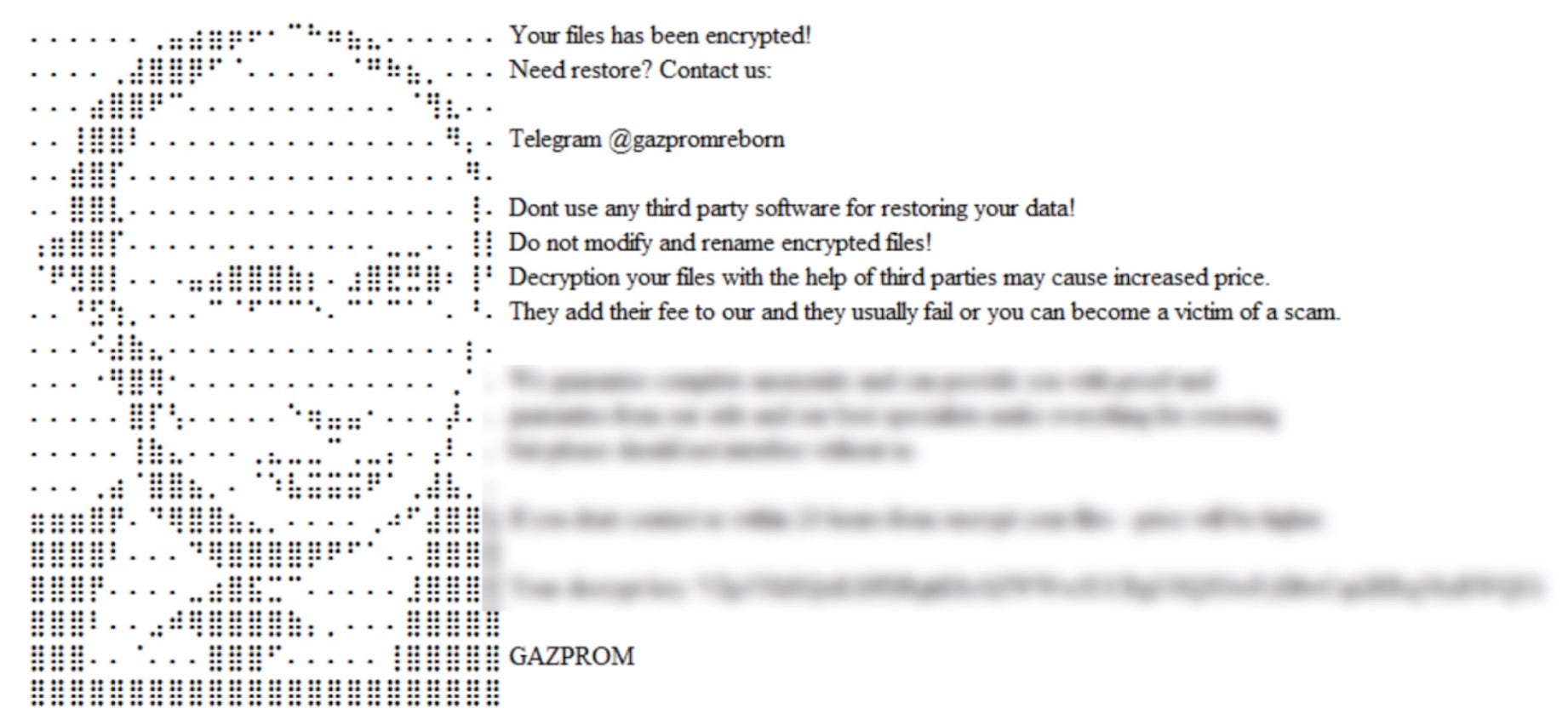
Once encrypted, affected files are modified with a .GAZPROM extension. Ransom notes are dropped in all directories containing encrypted files. These notes are written in .HTA and .HTML format as “GAZPROM_DECRYPT.hta” and “GAZPROM_DECRYPT.html” respectively.
Upon infection, victims are required to contact the attacker via a channel supplied in the ransom note to receive further information. The threat actor has operated multiple support channels throughout the existence of the ransomware. GAZPROM ransom notes indicate that if the victims fail to initiate communication with the attacker within 24 hours, the ransom will be increased.
How to Detect GAZPROM Ransomware
The SentinelOne Singularity XDR Platform can identify and stop any malicious activities and items related to GAZPROM ransomware.
In case you do not have SentinelOne deployed, detecting GAZPROM ransomware requires a combination of technical and operational measures designed to identify and flag suspicious activity on the network. This allows the organization to take appropriate action, and to prevent or mitigate the impact of the ransomware attack.
To detect GAZPROM ransomware without SentinelOne deployed, it is important to take a multi-layered approach, which includes the following steps:
- Use anti-malware software or other security tools capable of detecting and blocking known ransomware variants. These tools may use signatures, heuristics, or machine learning algorithms, to identify and block suspicious files or activities.
- Monitor network traffic and look for indicators of compromise, such as unusual network traffic patterns or communication with known command-and-control servers.
- Conduct regular security audits and assessments to identify network and system vulnerabilities and ensure that all security controls are in place and functioning properly.
- Educate and train employees on cybersecurity best practices, including identifying and reporting suspicious emails or other threats.
- Implement a robust backup and recovery plan to ensure that the organization has a copy of its data and can restore it in case of an attack.
How to Mitigate GAZPROM Ransomware
The SentinelOne Singularity XDR Platform can return systems to their original state using either the Quarantine or Repair.
In case you do not have SentinelOne deployed, there are several steps that organizations can take to mitigate the risk of GAZPROM ransomware attacks:
Educate employees: Employees should be educated on the risks of ransomware, and on how to identify and avoid phishing emails, malicious attachments, and other threats. They should be encouraged to report suspicious emails or attachments, and to avoid opening them, or clicking on links or buttons in them.
Implement strong passwords: Organizations should implement strong, unique passwords for all user accounts, and should regularly update and rotate these passwords. Passwords should be at least 8 characters long, and should include a combination of uppercase and lowercase letters, numbers, and special characters.
Enable multi-factor authentication: Organizations should enable multi-factor authentication (MFA) for all user accounts, to provide an additional layer of security. This can be done through the use of mobile apps, such as Google Authenticator or Microsoft Authenticator, or through the use of physical tokens or smart cards.
Update and patch systems: Organizations should regularly update and patch their systems, to fix any known vulnerabilities, and to prevent attackers from exploiting them. This includes updating the operating system, applications, and firmware on all devices, as well as disabling any unnecessary or unused services or protocols.
Implement backup and disaster recovery: Organizations should implement regular backup and disaster recovery (BDR) processes, to ensure that they can recover from ransomware attacks, or other disasters. This includes creating regular backups of all data and systems, and storing these backups in a secure, offsite location. The backups should be tested regularly, to ensure that they are working, and that they can be restored quickly and easily.
Frequently Asked Questions
GAZPROM is a ransomware strain that first appeared in March 2023, taking its name from the Russian energy company. It’s essentially a Conti ransomware offshoot – the attackers built it using re-used code from the leaked Conti ransomware. The choice of the name “Gazprom” and some messaging in its ransom notes suggest there may be a political or pro-Russian motivation behind the campaign. In practice, though, GAZPROM functions like any other major ransomware: it breaches victims’ networks, encrypts their files, and then demands a ransom payment (sometimes callreusedelf “Gazprom Locker” or “Gazprom Reborn” in different incidents).
GAZPROM typically breaks in via vulnerable, internet-facing systems. The attackers scan for publicly exposed servers or applications with known security flaws or weak protections. For instance, an unpatched web server, an outdated VPN appliance, or an open Remote Desktop (RDP) port could serve as the entry point. They exploit those weaknesses to gain a foothold in the network.
Once inside, the GAZPROM attackers often deploy remote access tools like AnyDesk and use penetration frameworks like Cobalt Strike to move laterally and escalate their access within the victim’s environment. After they’ve compromised key systems, they execute the ransomware payload to encrypt as many files and servers as possible.
When GAZPROM ransomware encrypts files, it makes them completely inaccessible and renames them with a new extension. Specifically, it appends “.GAZPROM” to each file’s name. For example, a file originally named presentation.pptx would be changed to presentation.pptx.GAZPROM. The contents of these files are scrambled with strong encryption, so you cannot open or use them anymore. Along with encrypting files, GAZPROM creates ransom note files on the system (one as a pop-up HTA application and another as an HTML file) to inform the victim. In summary, any file encrypted by GAZPROM will have the “.GAZPROM” extension added and will be unusable until decrypted.
A GAZPROM infection is usually very apparent from the file and system changes. The clearest sign is that many of your files suddenly have the extension “.GAZPROM” appended to their names (e.g. photo.jpg becomes photo.jpg.GAZPROM) – and none of t properly anymore. Additionally, you will see the ransom notes: for example, a window might pop up titled GAZPROM_DECRYPT.hta, and an HTML file DECRYPT_GAZPROM.html will likely be saved on your desktop or in each folder, most unmistakable encrypted files if your files are renamed with.GAZPROM and you find those ransom note files referencing “Gazprom” is a sure indicator that GAZPROM ransomware has infiltrated your system.
Preventing GAZPROM ransomware involves strengthening cyber defenses to close off its common attack vectors. First, keep all internet-facing software updated with the latest security patches – GAZPROM often exploits known vulnerabilities in unpatched servers or applications. Next, secure remote access: if you have RDP, VPN, or other remote login services, protect them with strong, unique passwords and enable multi-factor authentication (or turn off remote services that aren’t necessary). Use network firewalls to limit exposure of critical ports and monitor incoming traffic for any suspicious attempts. Running up-to-date endpoint security software (anti-virus/EDR) on your systems can help detect or block malware that slips in. And most importantly, regularly back up your important data to offline storage. Recent backups mean that even if ransomware encrypts your files, you can restore your data without paying the criminals.